Comparison
Best WhatsApp CRM Software: A Practical Buyer’s Guide
A neutral, evidence-led framework for comparing WhatsApp CRM software against the workflows, controls, costs, and team requirements that matter to your business.
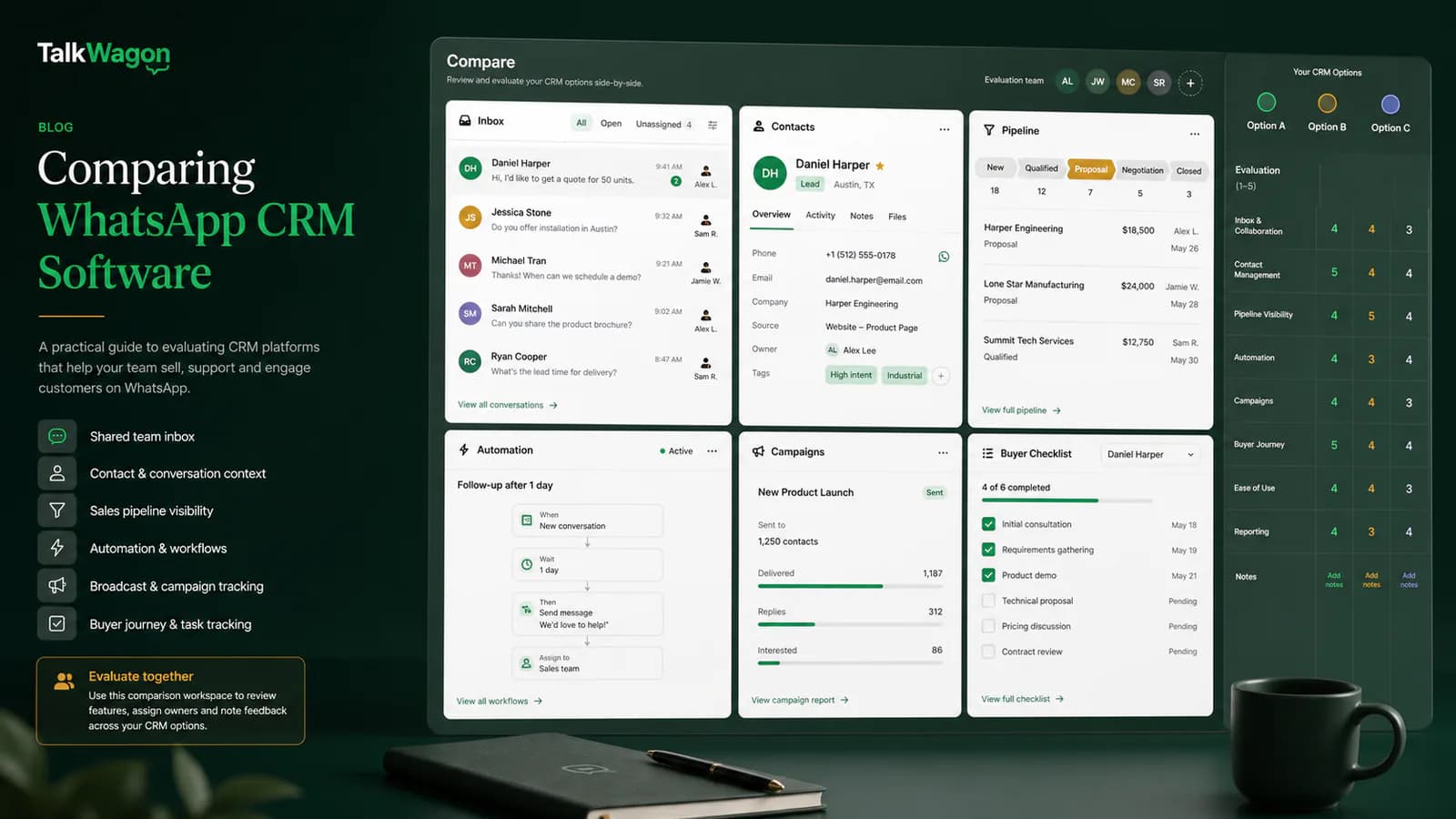
Choosing the best WhatsApp CRM is not a contest to find the longest feature list. It is a buying decision about how customer conversations become owned work: who replies, what context they see, how a lead progresses, what can be automated, how campaigns are controlled, and what the full system costs.
This guide uses a neutral evaluation method. It compares the current positioning of eight platforms, explains the trade-offs behind common buying decisions, and gives you a practical scorecard to test with your own team. Product details and pricing models were checked against official vendor pages on July 25, 2026, but software changes quickly; confirm final limits and commercial terms before buying.
Quick answer: start with your operating model, not a vendor name. Choose a WhatsApp-first CRM when WhatsApp is the center of sales and support. Choose an omnichannel platform when several channels must share one queue. Choose a sales CRM when pipeline discipline is the primary need, or a commerce platform when catalog, checkout, and store automation dominate.
No platform is the best choice for every company. The right result depends on workflow fit, team structure, channel strategy, governance requirements, and total cost.
What “best WhatsApp CRM” should mean for your business
A CRM is only useful when it helps people complete work consistently. For a WhatsApp-focused team, that usually means six connected outcomes:
- Every conversation has an owner and a visible status.
- Agents see the customer, history, notes, tags, and related commercial context.
- Sales opportunities move through a defined pipeline or lifecycle.
- Repetitive work can be automated without hiding exceptions.
- Broadcasts use approved templates, consent-aware audiences, exclusions, and traceable reporting.
- Managers can control access and understand what happened.
The “best” product is the one that meets the weighted requirements of your actual workflow with acceptable cost, implementation effort, and risk. A tool can be excellent for a Shopify brand and still be the wrong choice for a B2B sales team. An omnichannel service platform can be powerful and still be unnecessarily complex for a WhatsApp-only operation.
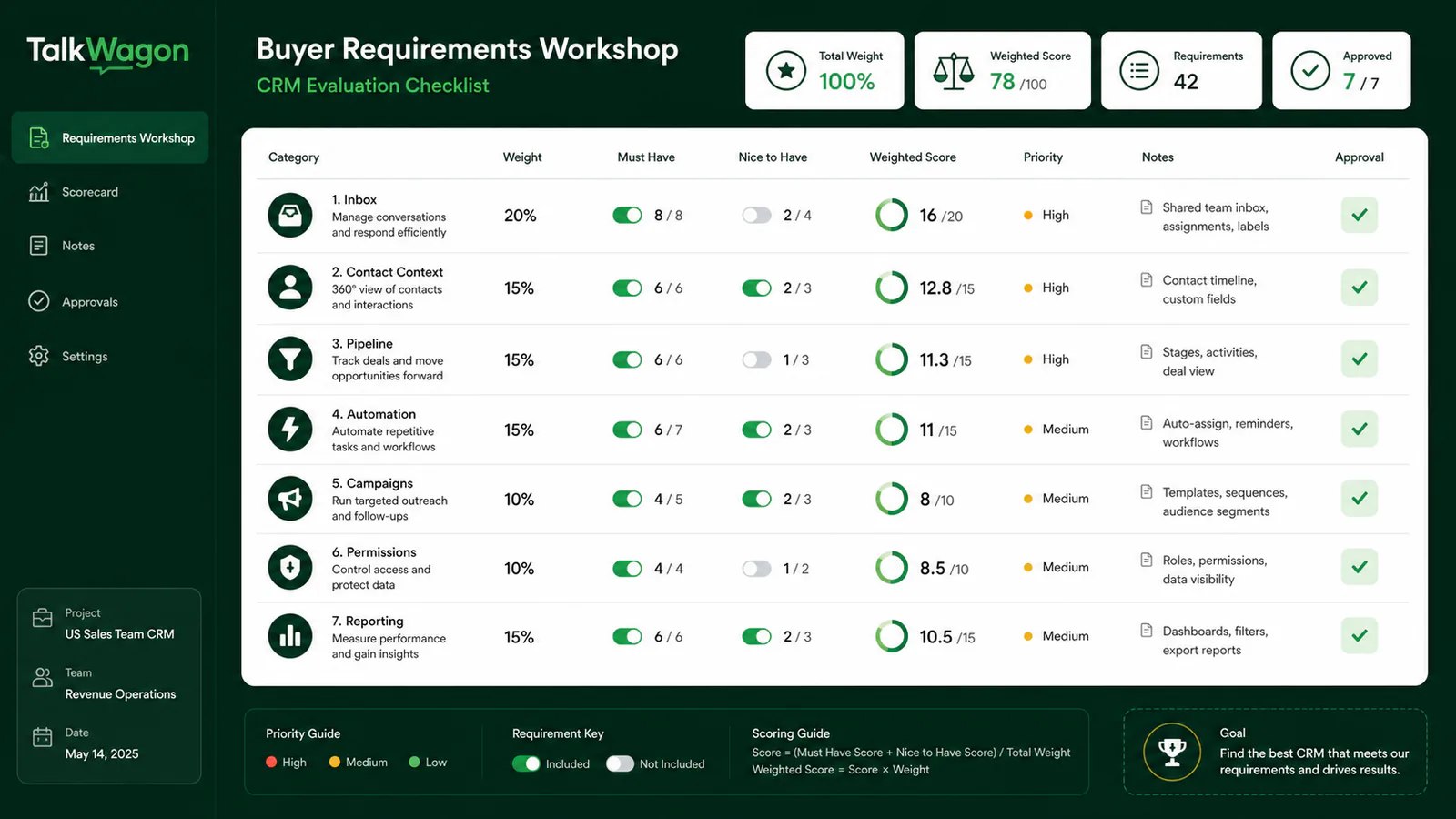
Create the scorecard before watching demos. Otherwise, attractive features can distract from the work your team must complete every day.
WhatsApp Business app, platform, and CRM are different layers
Buyers often compare products that solve different problems.
WhatsApp Business app
The app is suited to a small operation that can work within its device and collaboration limits. It provides business messaging features, but it is not a full CRM operating layer with granular permissions, structured pipeline management, cross-team reporting, and configurable workflow automation.
WhatsApp Business Platform
The platform is the official business messaging infrastructure used by software providers and businesses for scalable messaging. It governs phone-number connection, templates, messaging rules, and Meta charges. A CRM can simplify this work, but it does not replace Meta’s policies or fees.
WhatsApp CRM software
A WhatsApp CRM software product adds the operational layer around the channel: team inbox, assignment, contact history, fields, tags, pipeline or lifecycle stages, broadcasts, automation, integrations, permissions, and reporting. Some products are WhatsApp-first; others place WhatsApp inside a broader omnichannel or sales platform.
Before comparing vendors, decide which layer you need. If the requirement is only a business profile and occasional manual replies, a CRM may be unnecessary. If several people must sell, support, automate, or report from one business number, a CRM becomes much more valuable.
A neutral four-step evaluation method
Use the same method for every shortlisted product:
- Define requirements. Document business goals, must-haves, constraints, compliance responsibilities, user roles, data sources, and success criteria.
- Shortlist by operating model. Remove platforms that do not fit your core channel mix, sales model, service model, commerce stack, or team size.
- Test real workflows. Use the same contacts, conversations, campaign scenario, automation, roles, and report in every trial.
- Compare total cost and risk. Add subscription, Meta charges, seats, contacts, hosted numbers, onboarding, integrations, AI, support, migration, and likely overages.
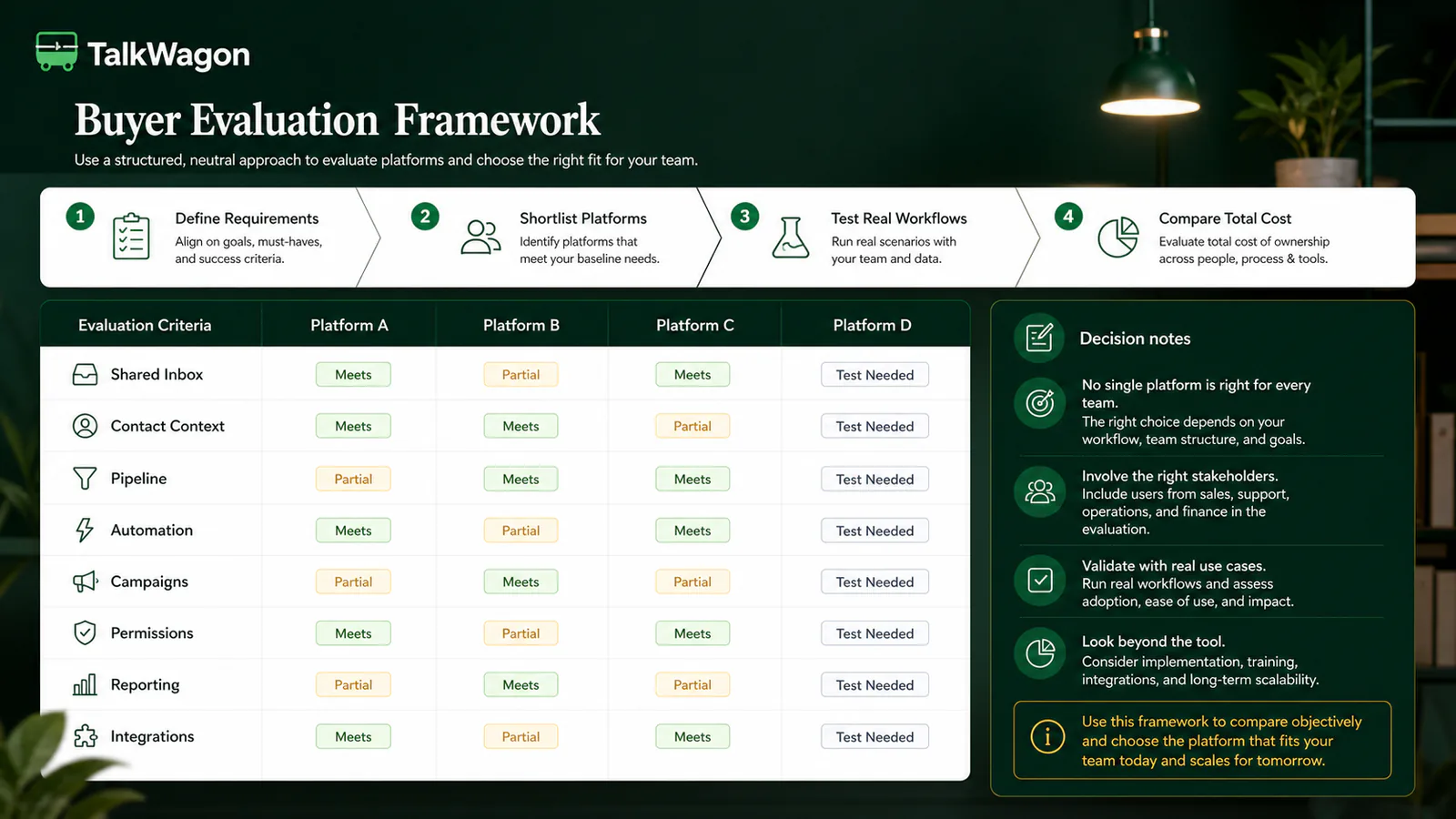
A neutral framework prevents a vendor’s strongest demo from becoming your entire buying process.
Suggested weighting
| Evaluation category | Example weight | What to verify |
|---|---|---|
| Shared inbox and collaboration | 20% | Assignment, collision prevention, notes, status, queues |
| Contact and conversation context | 15% | Timeline, fields, tags, related records, search |
| Pipeline or lifecycle | 15% | Stages, owners, tasks, activity, forecasting |
| Automation and handoff | 15% | Triggers, conditions, waits, exceptions, audit trail |
| Campaign controls | 10% | Consent, templates, segmentation, exclusions, reporting |
| Integrations and channels | 10% | Required systems, APIs, webhooks, additional channels |
| Permissions and governance | 10% | Roles, workspace isolation, sensitive actions, exports |
| Reporting and usability | 5% | Operational visibility, adoption, exports, manager views |
Change the weights to match your business. A support center may place more weight on inbox routing and service reporting. A B2B sales team may increase pipeline and activity management. An ecommerce operation may prioritize Shopify context, catalogs, order events, and commerce automation.
WhatsApp CRM software compared
The table below is an orientation map, not a permanent ranking. It summarizes how each vendor presents its product on its official website as of July 25, 2026.
| Platform | Primary operating model | Current strengths to evaluate | Pricing model to examine | Likely fit |
|---|---|---|---|---|
| TalkWagon | WhatsApp-first CRM | Shared inbox, contacts, pipelines, broadcasts, automations, visual flows, AI knowledge workflow, team permissions | CRM plan plus separate WhatsApp/Meta costs | Teams wanting one focused WhatsApp sales and support workspace |
| WATI | WhatsApp-first engagement platform | Team inbox, contact management, campaigns, chatbots, automation, Instagram options, APIs and add-ons by plan | Subscription plus messaging charges and optional add-ons | Teams prioritizing WhatsApp campaigns, inbox work, and chatbot tooling |
| respond.io | Omnichannel conversation platform | Multi-channel inbox, lifecycle management, workflows, broadcasts, AI agents, CRM and automation integrations | Monthly active contacts, plan features, possible usage charges, Meta fees separate | B2C teams consolidating WhatsApp and several other channels |
| Kommo | Conversational sales CRM | Pipeline, unified inbox, complete lead history, tasks, broadcasts, Salesbot, messenger integrations | Per-user subscription, plan limits, WhatsApp/Meta costs | Sales teams that want messaging tied closely to pipeline execution |
| Interakt | WhatsApp and Instagram sales/commerce CRM | Shared inbox, campaigns, workflows, APIs/webhooks, commerce-oriented tools | Subscription tier plus template messaging charges | D2C and commerce teams centered on WhatsApp and Instagram |
| SleekFlow | Omnichannel social-commerce platform | Inbox, Flow Builder, broadcasts, AI agents, analytics, APIs and commerce integrations by tier | Monthly active contacts, users, hosted numbers, message charges, add-ons | Growing social-commerce teams needing multiple channels and integrations |
| Trengo | Omnichannel customer service platform | Shared inbox across messaging, email, chat and voice, AI agents, journeys, reporting | Users and conversation allowance, add-ons and usage charges | Service teams that need a broad channel mix in one support operation |
| Zoko | WhatsApp commerce platform | Shopify-oriented broadcasts, catalog and commerce workflows, agents, API/webhooks, automation playbooks | Subscription plus conversation, agent, flow, AI and WhatsApp charges depending on use | Shopify-led brands whose customer journey is strongly commerce-centric |
This table deliberately avoids declaring a universal winner. Feature availability can depend on plan, region, account configuration, integration, and vendor changes. Use official documentation and a trial to validate anything that could block your process.
A useful first shortlist
- Start with TalkWagon or WATI when WhatsApp is the operational center and you want a focused workspace.
- Include respond.io, SleekFlow, or Trengo when several channels must share an inbox and automation layer.
- Include Kommo when a formal sales pipeline is the dominant requirement.
- Include Interakt or Zoko when commerce and store workflows are central.
These are starting points, not endorsements. A platform from another category may still win your evaluation if it handles your real work better.
Test 1: shared inbox and contact context
A polished inbox demo is not enough. Test what happens during a busy shift:
- Can an unassigned conversation be claimed or routed without two agents replying?
- Is the owner clear in the list and conversation?
- Can agents leave internal notes without exposing them to customers?
- Does the profile show previous conversations, fields, tags, purchases or deals, and open tasks?
- Can a manager filter by team, owner, status, tag, or response state?
- When the conversation moves to another person, does the full context move with it?
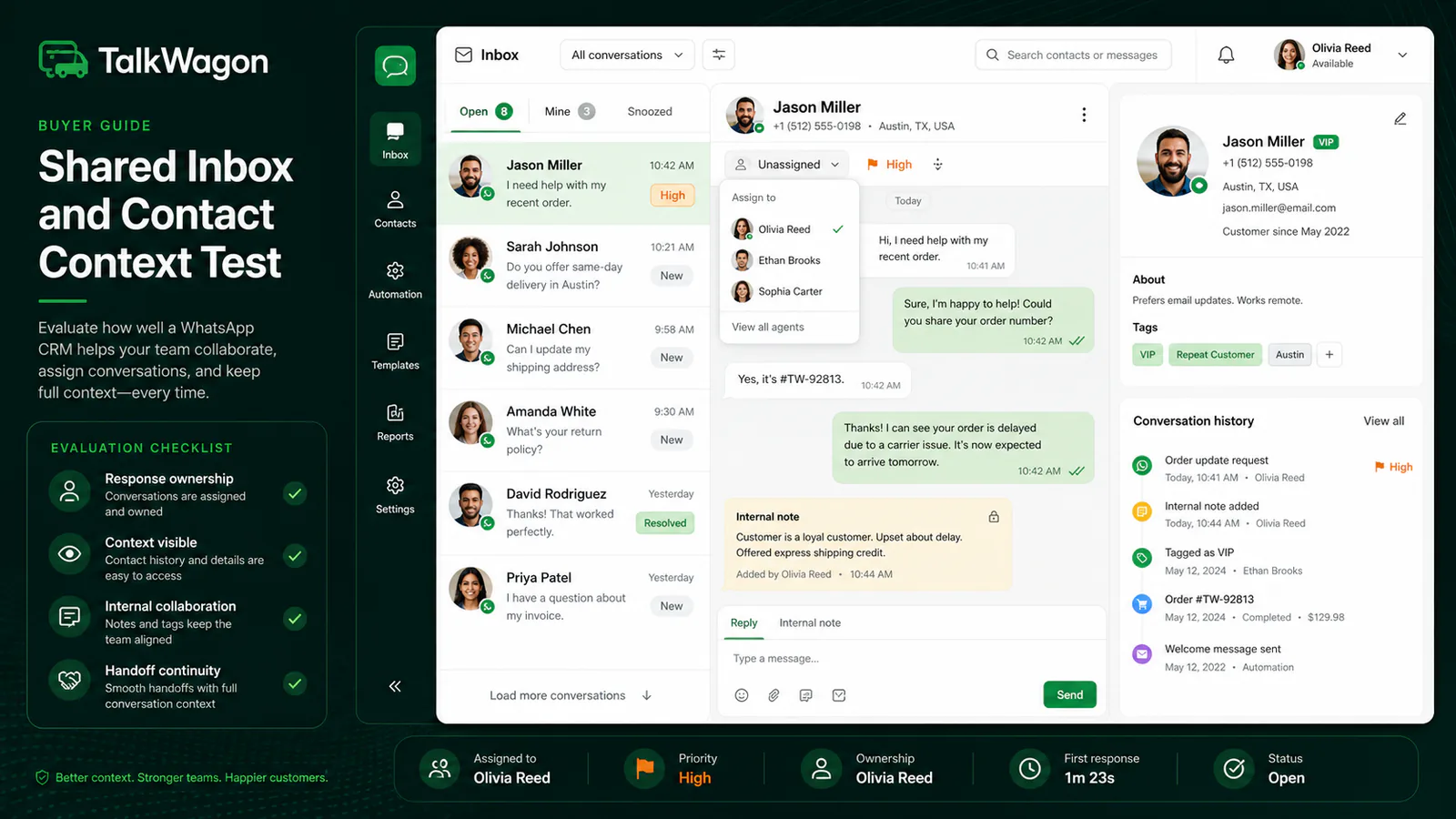
Use a real handoff scenario. The goal is not merely to send a reply; it is to preserve ownership and context from beginning to resolution.
For a focused implementation, review TalkWagon’s shared team inbox. If your operation requires email, voice, social messaging, and web chat in the same queue, compare the omnichannel models offered by respond.io, SleekFlow, and Trengo.
Test 2: contact-to-pipeline workflow
Many products call themselves a CRM while providing only a contact list. A sales team should test the complete path:
- A new conversation creates or matches the correct contact.
- The agent qualifies the opportunity and records important fields.
- A deal enters the appropriate pipeline stage.
- The owner and next task remain visible.
- Messages, notes, activities, and stage changes share one history.
- The manager can see pipeline movement without reconstructing it from chats.
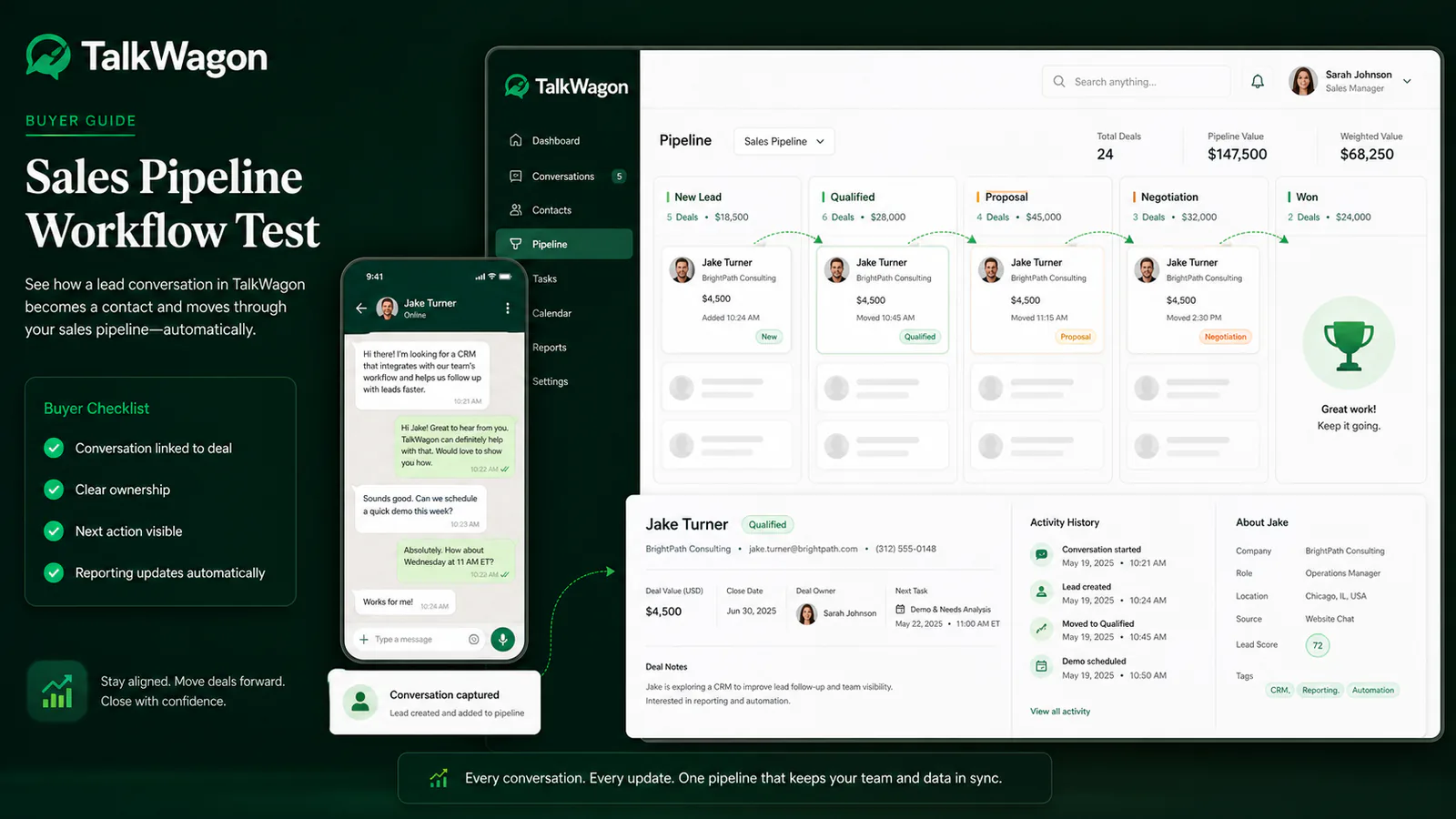
Pipeline depth separates a messaging inbox from a sales operating system. Test the exact stages, tasks, and reporting your team uses.
Kommo’s official product overview emphasizes a pipeline, inbox, and unified lead history. TalkWagon connects conversations with contacts and sales pipelines in the same CRM. Commerce-oriented platforms may organize the journey around orders and campaigns rather than a traditional opportunity pipeline. Neither model is inherently better; choose the one that matches how revenue work is managed.
Test 3: broadcasts, consent, and campaign operations
Broadcast capability should be evaluated as a controlled process, not a large “send” button. Confirm:
- where consent is recorded and how opt-outs are applied;
- which template categories and languages are supported;
- whether template approval status is visible;
- how audiences are segmented and excluded;
- whether frequency, scheduling, and queue controls exist;
- how sent, delivered, read, failed, and reply events are represented;
- what happens when credentials, templates, or recipient data are invalid;
- how software limits and Meta messaging charges are calculated.
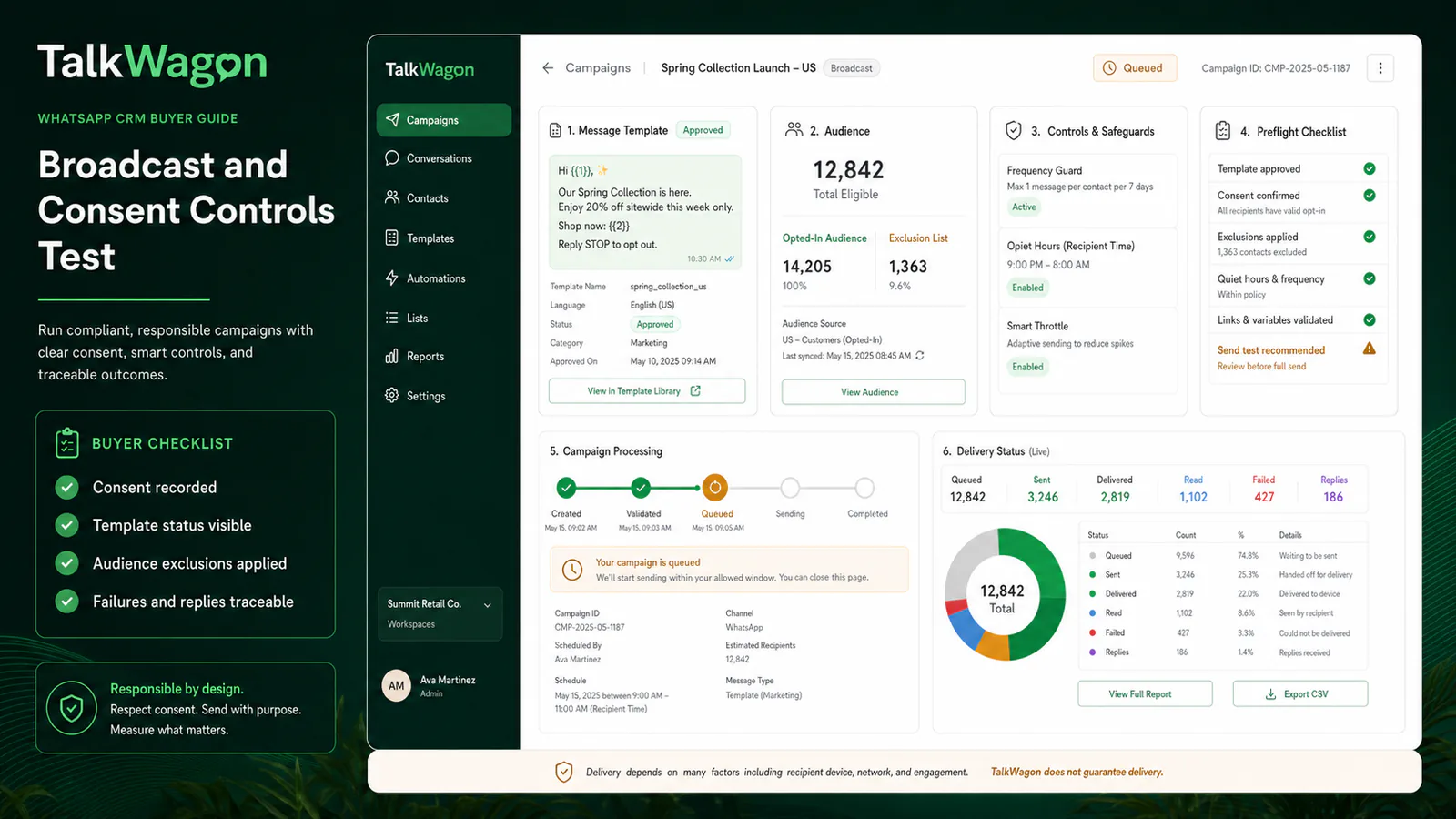
Use an opted-in test audience and inspect every state, including failure and reply handling. Delivery depends on several factors and should never be treated as guaranteed.
TalkWagon documents its broadcast workflow and separate WhatsApp API pricing estimator. WATI, respond.io, Kommo, Interakt, SleekFlow, and Zoko also present campaign or broadcast capabilities, but their limits and billing models differ. Confirm the exact plan and current WhatsApp Business Platform rules that apply to your market.
Test 4: automation, AI, and human handoff
Automation quality is defined by the exception path as much as the happy path. Build one real workflow with:
- a message or contact trigger;
- a wait or business-hours rule;
- a condition with at least two branches;
- assignment or routing;
- a tag or data update;
- an AI or scripted response, if relevant;
- a confidence or intent condition;
- immediate human handoff;
- an audit trail and measurable outcome.
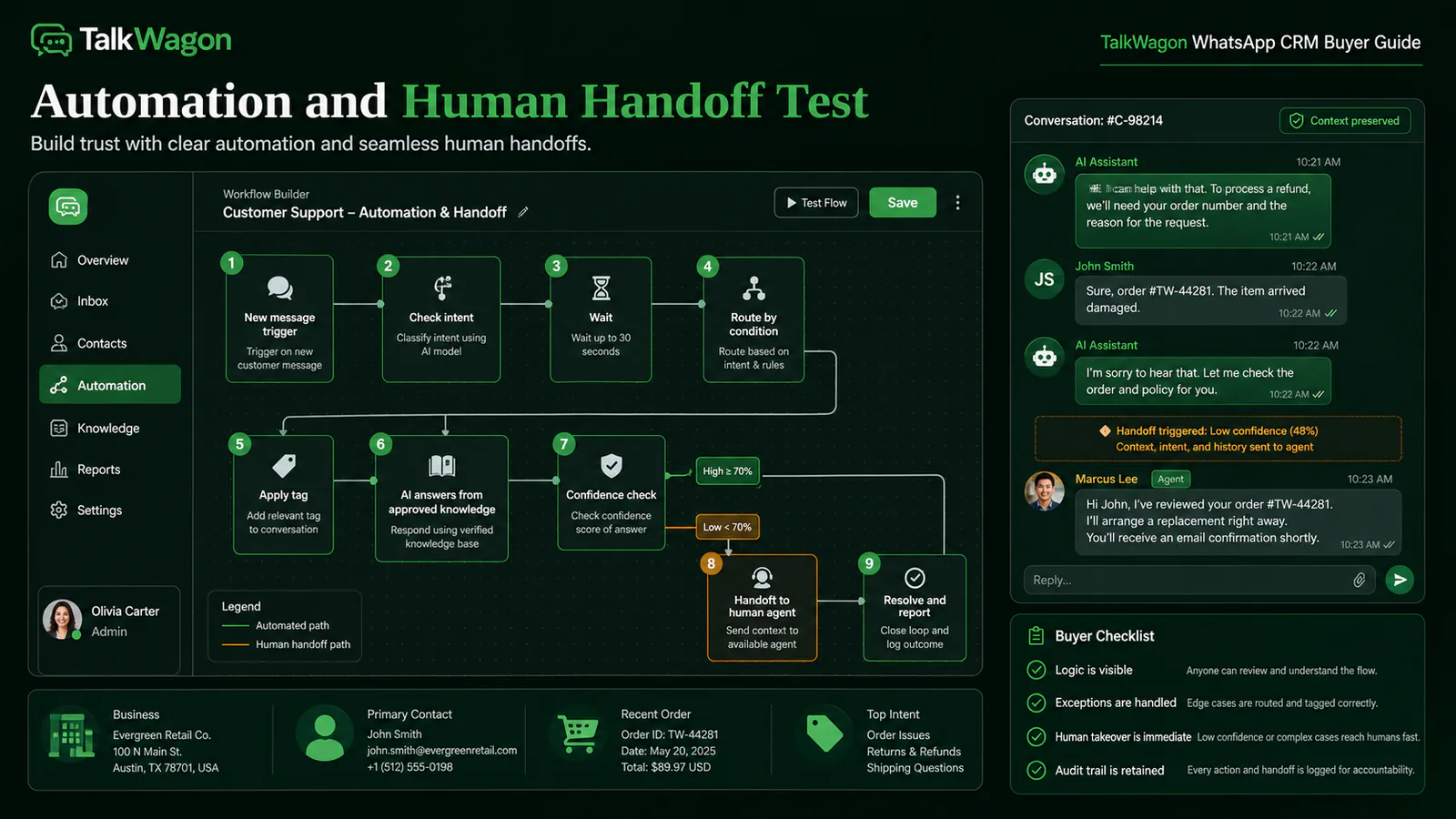
The best workflow is understandable to the people responsible for it. Human takeover should preserve the customer’s context and never depend on a hidden workaround.
TalkWagon provides automations, visual flows, and an AI chatbot that answers from approved business knowledge before handing off. Respond.io presents workflows and AI agents across multiple channels. WATI offers plan-dependent chatbots and automation triggers. Kommo connects Salesbot and AI capabilities to its pipeline. SleekFlow and Trengo emphasize AI and multi-step automation in an omnichannel model. Test limits, debugging, ownership, and handoff rather than comparing feature names.
Integrations and channel strategy
The phrase best CRM with WhatsApp integration can describe two different architectures:
- a CRM where WhatsApp is built into the core workflow; or
- an existing CRM connected to a separate messaging platform.
The first can reduce tool switching. The second may preserve a mature system of record such as Salesforce or HubSpot. Ask:
- Which system owns the contact and deal?
- Is synchronization one-way or two-way?
- How are duplicates matched?
- What happens when an integration fails?
- Can workflow actions call APIs or webhooks?
- Are integrations native, third-party, or custom?
- Is historical conversation data portable?
- Which channel and CRM limits affect cost?
If you are deciding between a native WhatsApp CRM and connecting WhatsApp to an existing system, read the practical guide to integrating WhatsApp with CRM.
Permissions, security, and operational control
Request a role matrix before purchase. Test with a non-owner account rather than accepting a slide that says “role-based access.”
At minimum, evaluate:
- workspace or business separation;
- access to contacts and conversations;
- export and delete permissions;
- campaign creation and approval;
- automation editing and activation;
- template and credential access;
- billing and user administration;
- audit visibility;
- offboarding and ownership transfer.
Also document who controls the WhatsApp Business Account, phone number, Meta business assets, API credentials, domain, and customer data. The software vendor should not become the only party that understands or controls your setup.
Calculate total cost, not the headline price
The subscription shown on a pricing card may be only one component. Build a monthly and annual model that includes:
- base software subscription;
- WhatsApp Business Platform messaging charges;
- active-contact or conversation allowances;
- team seats and role-specific users;
- hosted WhatsApp numbers;
- AI credits or resolutions;
- automation executions;
- campaigns or message limits;
- onboarding and implementation;
- integrations, APIs, and webhooks;
- premium support;
- migration and training;
- taxes and currency conversion;
- expected overages during seasonal peaks.
Official pricing pages illustrate why this matters. WATI describes subscription, messaging charges, and optional add-ons as separate components. Respond.io says WhatsApp fees are not included in its subscription and prices plans by monthly active contacts. SleekFlow uses monthly active contacts and separately identifies hosted-number and message costs. Kommo uses per-user plans. Trengo combines users and conversation allowances. Zoko lists plan, conversation, agent, flow, AI, and channel-related components. Interakt separates subscription and template charges.
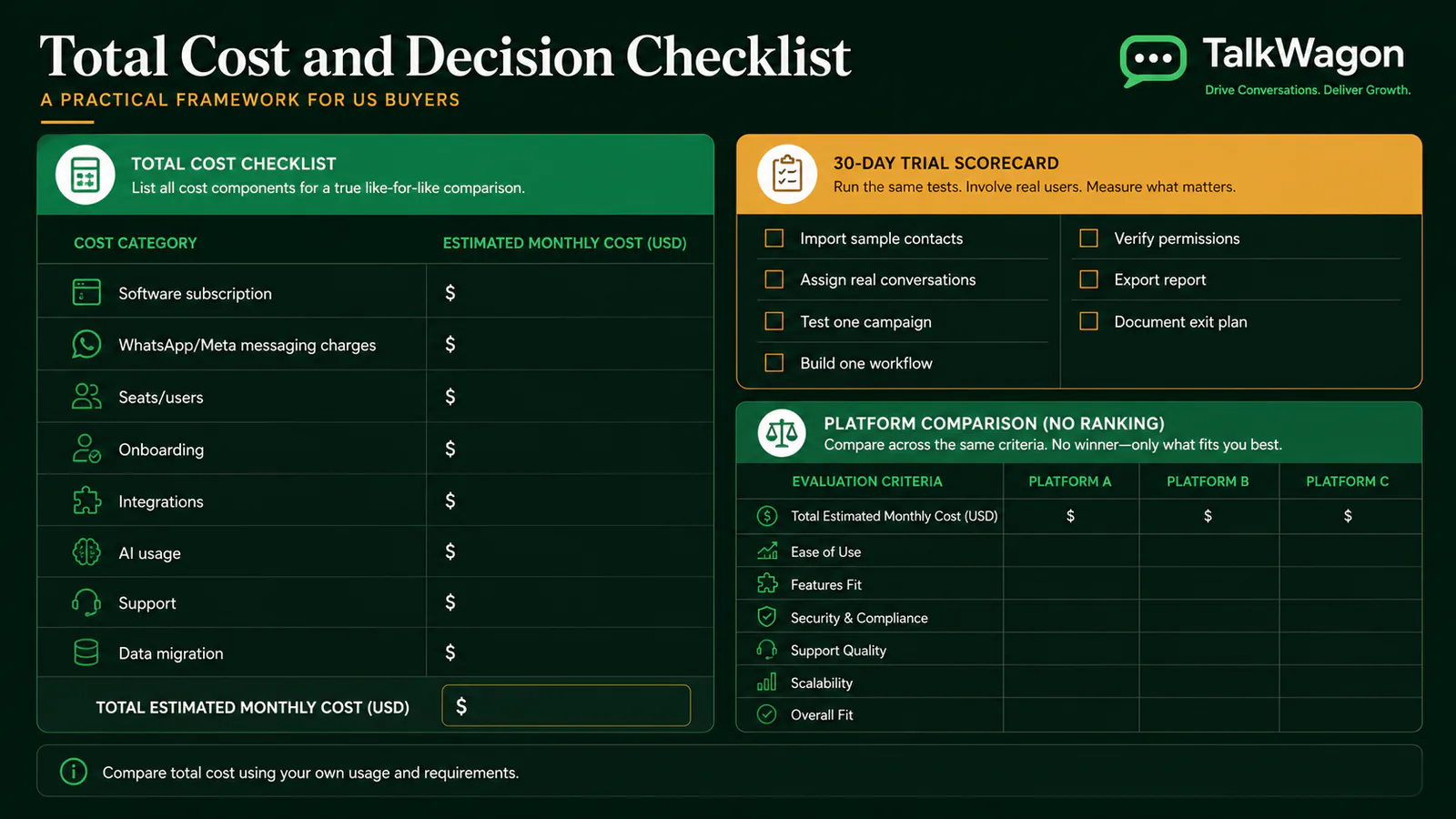
Use your own contact volume, message mix, users, channels, integrations, and peak periods. A lower headline fee can become more expensive after required add-ons; a higher plan can be wasteful if the extra capability is unused.
A 30-day proof-of-fit plan
Week 1: data and access
- Connect a test number or approved sandbox.
- Import representative contacts without exposing unnecessary personal data.
- Configure users, teams, roles, tags, fields, and pipeline stages.
- Verify ownership of Meta assets and document the setup.
Week 2: frontline workflows
- Assign and transfer real internal test conversations.
- Use notes, quick replies, search, and customer history.
- Create tasks and move sample opportunities through the pipeline.
- Measure whether users can complete work without side spreadsheets.
Week 3: campaign and automation
- Submit or synchronize an approved test template.
- Build an opted-in test audience and exclusion list.
- Run a small test campaign and inspect all statuses.
- Build one automation with a failure path and human handoff.
Week 4: governance and decision
- Test restricted roles and sensitive actions.
- Export contacts, conversations, campaign results, and reports where supported.
- Review logs, error handling, support response, and documentation.
- Calculate total cost at normal and peak usage.
- Score every platform using the same evidence.
Do not let a vendor-led demo replace this process. The people who will use the system should perform the tests and record friction, workarounds, missing context, and training needs.
When TalkWagon belongs on the shortlist
TalkWagon is designed for growing teams that want WhatsApp conversations, contacts, sales pipelines, template broadcasts, automations, visual flows, team permissions, reporting, and AI knowledge-assisted replies in one focused CRM.
It is a sensible candidate when:
- WhatsApp is the primary customer channel;
- both sales and support need a shared operating context;
- managers want conversation ownership and pipeline visibility;
- the team needs broadcasts and workflow automation in the same workspace;
- AI replies must use approved business knowledge and support human handoff;
- a focused CRM is preferable to a broad enterprise suite.
It may not be the right fit when a business requires a deeply specialized Shopify commerce stack, a mature enterprise sales CRM as its non-negotiable system of record, or a large omnichannel service operation spanning voice, email, social, and messaging under one vendor. Compare those requirements honestly.
Explore the TalkWagon feature overview, review pricing, or start a free trial after completing your requirements scorecard.
Final buyer checklist
Before signing:
- We defined our required workflows and weights.
- We compared the same scenarios in every platform.
- Frontline users tested inbox, context, and handoff.
- Sales tested contact-to-pipeline execution.
- Marketing tested consent, templates, exclusions, and reporting.
- Operations tested automation exceptions and audit visibility.
- An administrator tested restricted roles.
- We confirmed integrations and data ownership.
- We calculated subscription, WhatsApp, usage, add-on, and migration costs.
- We documented export and exit procedures.
- Every material claim was verified in current official documentation or a live trial.
The right decision is not the platform with the most green checks. It is the platform that handles your highest-value workflows reliably, gives the team enough context and control, and remains understandable at the cost and scale you expect.
Sources and verification notes
The comparison was reviewed on July 25, 2026 using current official product, pricing, and documentation pages:
- TalkWagon features and TalkWagon pricing
- WATI detailed plan comparison, team inbox, and pricing structure
- respond.io pricing, team inbox, and workflow documentation
- Kommo product overview and pricing
- Interakt US pricing
- SleekFlow pricing
- Trengo pricing
- Zoko pricing
- WhatsApp Business Platform pricing documentation
TalkWagon is not affiliated with WATI, respond.io, Kommo, Interakt, SleekFlow, Trengo, Zoko, Meta, or WhatsApp. Third-party names are used only for independent comparison. Product details, policies, limits, and prices can change; verify current terms directly before purchase.
Frequently asked questions
What is the best WhatsApp CRM for a small business?
The best fit depends on the work the team needs to complete. A small business should normally prioritize a shared inbox, clear ownership, contact history, simple automation, approved-template broadcasts, transparent limits, and a price model it can forecast. Test those workflows with real users instead of choosing from a feature count alone.
Is a WhatsApp CRM different from the WhatsApp Business app?
Yes. The WhatsApp Business app is useful for a small operation on a limited number of devices. A WhatsApp CRM typically adds team assignment, contact records, permissions, automation, reporting, pipeline or lifecycle tracking, and controlled use of the WhatsApp Business Platform.
Does CRM subscription pricing include Meta messaging charges?
Often it does not. Many providers separate the software subscription from WhatsApp Business Platform messaging charges, and some also charge for active contacts, users, hosted numbers, automation, AI, onboarding, or add-ons. Confirm every cost component in writing.
Should I choose a WhatsApp-first CRM or an omnichannel platform?
Choose a WhatsApp-first CRM when WhatsApp is the main operating channel and you want focused setup and workflows. Choose an omnichannel platform when email, voice, web chat, Instagram, and other channels must share one queue and reporting model. The right choice follows your channel mix, not a universal ranking.
What should I test during a WhatsApp CRM trial?
Import sample contacts, assign real conversations, verify contact history, move a lead through the pipeline, run a test campaign to opted-in recipients, build one automation with an exception path, test human handoff, verify permissions, export a report, and document how data can be exported.
Can a WhatsApp CRM send broadcast messages?
Many can, but the workflow and limits vary. Check template approval visibility, consent records, audience segmentation, exclusions, scheduling, queue behavior, failure reporting, replies, and any software or Meta messaging charges.
How do I avoid choosing the wrong WhatsApp CRM?
Write weighted requirements before demos, compare the same real workflows in every platform, include frontline users in testing, calculate total cost rather than headline price, review permissions and data portability, and record evidence for every decision.
Is TalkWagon the best choice for every company?
No platform is the best choice for every company. TalkWagon is designed for teams that want a WhatsApp-focused CRM with a shared inbox, contact and pipeline context, broadcasts, automations, flows, permissions, and an AI knowledge workflow. Teams that require a different channel mix or specialist commerce stack should compare those needs directly.