WhatsApp Templates
WhatsApp Event Invitation Messages: Templates, Timing, and RSVP Workflows
A practical guide to WhatsApp event invitation messages for webinars, launches, workshops, appointments, open houses, and customer events.
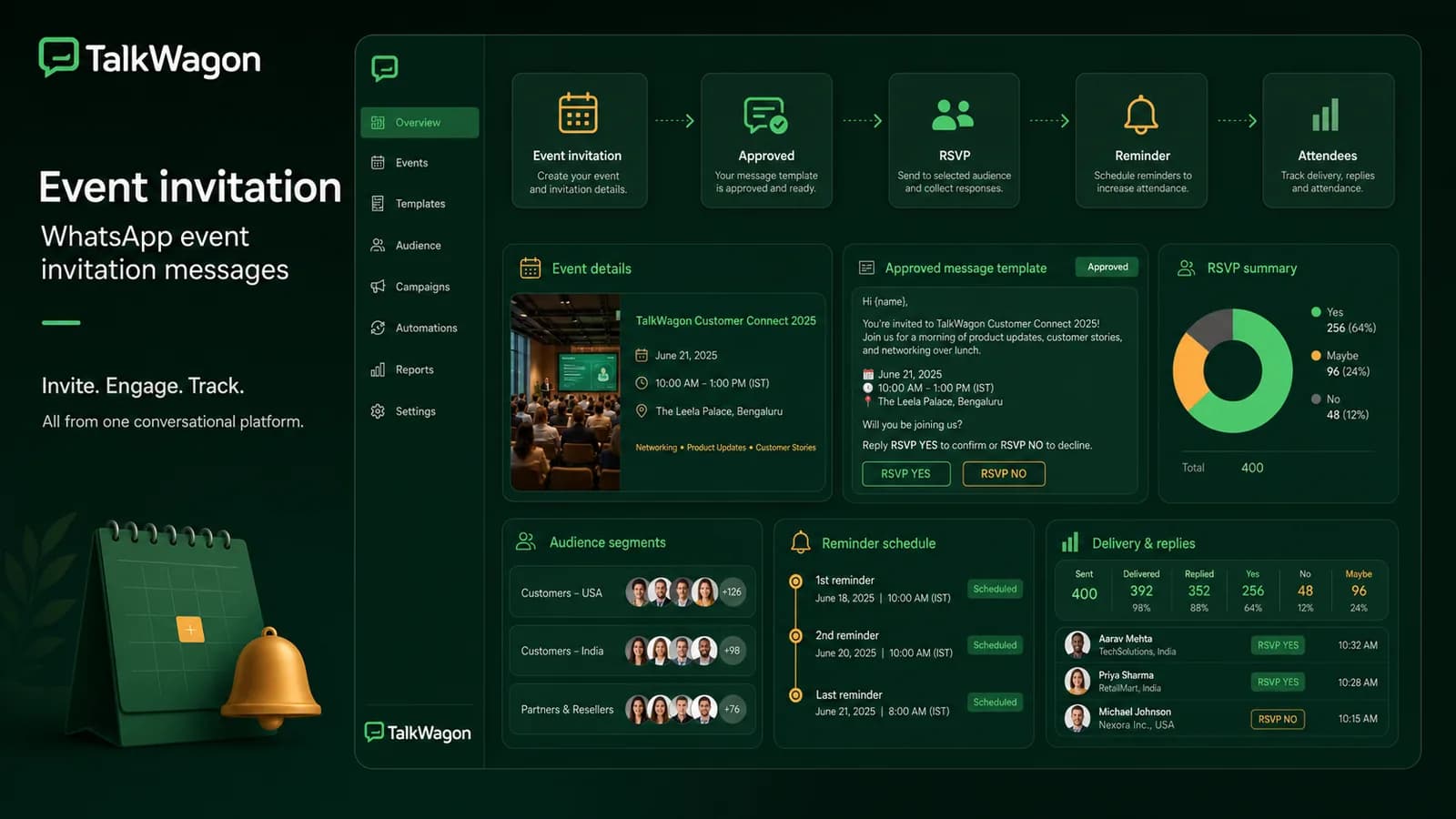
A strong WhatsApp message for event invitation does more than announce an event. It explains why the recipient should care, gives the essential details, makes RSVP easy, and prepares the team for questions, reminders, and follow-up.
This guide is written for businesses that run webinars, workshops, launches, open houses, demos, local events, customer training, or appointment-based sessions. It focuses on useful event communication, not spammy invitation blasts.
Quick answer: a good WhatsApp event invitation includes the event name, audience, benefit, date, time, location or link, RSVP action, deadline, reminder plan, and a clear path for questions or opt-out.
What an event invitation message must include
Most event invitation examples online focus on wording. Wording matters, but businesses also need structure.
Include:
- event name;
- who the event is for;
- reason to attend;
- date and time;
- timezone if online or international;
- location or joining link;
- RSVP action;
- RSVP deadline;
- what happens after RSVP;
- support or questions path;
- opt-out wording when relevant.
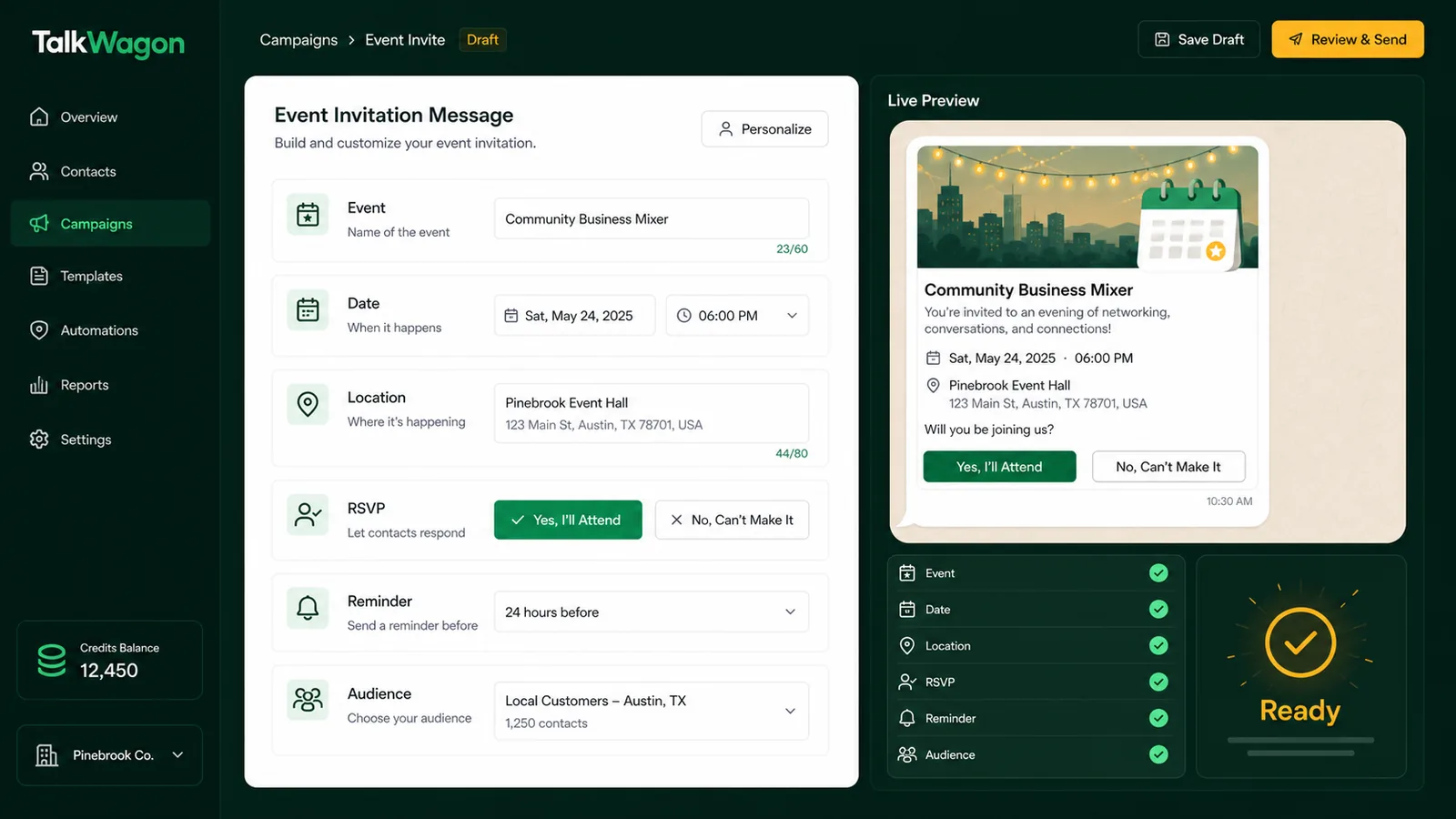
An event invitation should make the next step obvious: RSVP, ask a question, save the date, or decline.
Event invitation messages by use case
Webinar invitation
Hi {{name}}, you’re invited to our live webinar on {{topic}} on {{date}} at {{time}}. We’ll cover {{benefit}} and answer questions at the end. Reply YES to reserve your seat or NO if you cannot attend.
Product launch invitation
Hi {{name}}, we’re hosting a customer preview for {{product}} on {{date}} at {{time}}. You’ll see what’s new and how it can help your team. Reply JOIN if you’d like the access link.
Local workshop invitation
Hi {{name}}, we’re running a hands-on workshop at {{location}} on {{date}}. Seats are limited, and this session is best for {{audience}}. Reply 1 to attend or 2 if you need more details.
Appointment-based event
Hi {{name}}, your consultation slot for {{event_name}} is available on {{date}} at {{time}}. Reply CONFIRM to keep the slot or CHANGE if you need another time.
Customer appreciation event
Hi {{name}}, we’re inviting selected customers to {{event_name}} on {{date}}. It’s a small thank-you event with updates, Q&A, and networking. Reply YES if you’d like to join.
Marketing or utility template?
Many event invitations are marketing because they promote attendance or engagement. A reminder for an event the customer already registered for may be closer to a utility update. The final category depends on the exact message purpose.
If you use the WhatsApp Business Platform to initiate event messages, Meta’s template guidance is important because proactive messages usually need approved templates. A CRM should store each event message with its purpose, category, approval status, language, and audience.
RSVP and reminder workflow
An invitation should not stop after the first message. The event workflow should capture replies and guide the team.
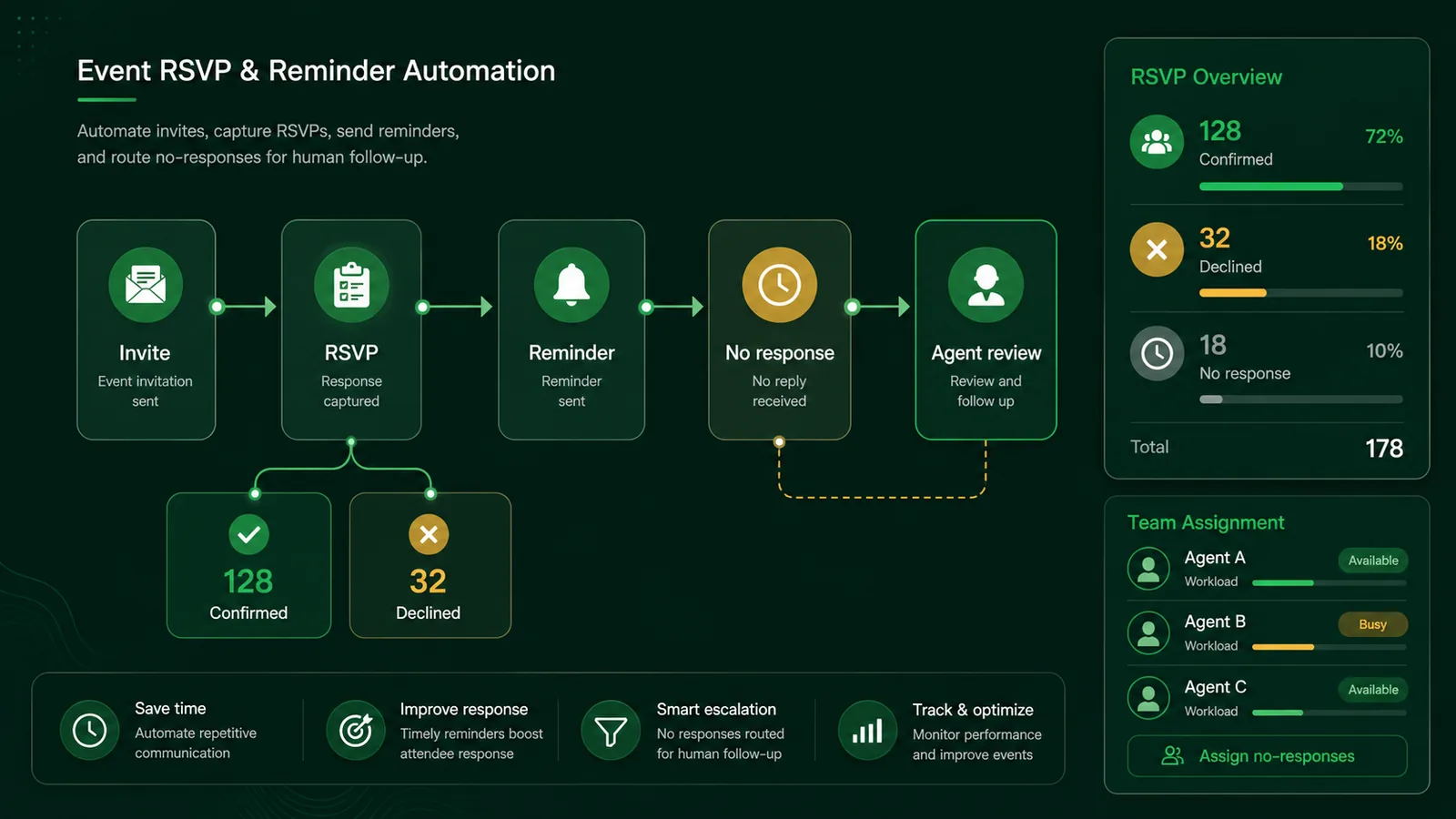
RSVP workflows should separate confirmed, declined, no-response, and question-handling paths so the team knows what to do next.
A practical workflow:
- Send invitation to the correct segment.
- Capture RSVP replies.
- Tag confirmed, declined, and no-response contacts.
- Send confirmation details to confirmed contacts.
- Send one useful reminder before the event.
- Route questions to a human agent.
- Send post-event follow-up based on attendance.
For most business events, one invitation, one confirmation, and one reminder is enough. High-value webinars or in-person events may justify a final same-day reminder, but repeated reminders can feel pushy.
How to write the RSVP action
Make the reply simple. The best RSVP action is usually one of:
- “Reply YES to attend.”
- “Tap Confirm.”
- “Reply 1 for yes or 2 for no.”
- “Reply JOIN for the access link.”
- “Reply INFO if you have a question.”
Avoid asking the customer to write a long response. The easier the action, the cleaner your tracking becomes.
Timing recommendations
Timing depends on event type.
| Event type | Invitation timing | Reminder timing |
|---|---|---|
| Webinar | 5–10 days before | 24 hours before and optionally 1 hour before |
| Local workshop | 7–14 days before | 48 or 24 hours before |
| Appointment event | After slot selection | 24 hours before |
| Product launch | 5–14 days before | Same day or 24 hours before |
| Customer meetup | 2–4 weeks before | 1 week and 24 hours before |
If the event requires travel, parking, preparation, or attendance limits, send earlier. If it is a simple online session, keep the sequence lighter.
Segmentation for event invitations
Do not invite everyone to every event. Segment by interest, geography, customer stage, purchase history, language, timezone, and past attendance.
Examples:
- Invite trial users to onboarding sessions.
- Invite active customers to product training.
- Invite local leads to a city workshop.
- Invite high-intent contacts to a demo event.
- Exclude customers who already registered.
- Exclude contacts who opted out of marketing messages.
Better segmentation usually improves RSVP quality and reduces complaints.
Writing framework for event invitations
Use this five-part framework when writing an invitation:
- Reason: why the recipient is getting the invitation.
- Benefit: what they will gain by attending.
- Details: date, time, location, and format.
- Action: exactly how to RSVP.
- Support: how to ask questions or stop receiving updates.
Example:
Hi {{name}}, you’re invited because you asked for updates about {{topic}}. Join our live session on {{date}} at {{time}} to learn {{benefit}}. Reply YES to reserve a seat or HELP if you have a question.
This works better than a generic message because it gives context, benefit, and action in one short flow.
Consent and expectation checks
Event invitations can be useful, but they can also feel intrusive if sent to the wrong audience. Before sending, confirm why each recipient should expect the invitation.
Good reasons include:
- they registered interest;
- they are an existing customer;
- they joined a previous related event;
- they opted in to updates;
- they requested a demo or training;
- they belong to a relevant account segment.
Weak reasons include:
- their number exists in an old spreadsheet;
- they once asked an unrelated question;
- they are in the same city but never opted in;
- the business wants a bigger audience.
When the reason is weak, send a softer opt-in message or use another channel first.
Event invitation planning table
| Event type | Audience | Message angle | Follow-up |
|---|---|---|---|
| Webinar | Leads or customers interested in a topic | Learn a specific outcome | Send recording and next step |
| Product launch | Existing customers or warm leads | See what changed and why it matters | Route questions to sales/support |
| Workshop | Local or role-based segment | Reserve limited seat | Confirm attendance and materials |
| Open house | Local prospects | Visit at a specific time | Confirm location and directions |
| Customer training | Active customers | Improve product usage | Send recap and support path |
This planning step keeps the invitation from becoming a generic announcement.
Handling replies and questions
Event invitations often create questions:
- “Can I bring someone?”
- “Will this be recorded?”
- “Where is the link?”
- “Can I change my time?”
- “Is there a cost?”
If replies go to one phone, the team may miss them. In a shared inbox, replies can be assigned, tagged, and connected to the event record.
TalkWagon helps teams route event replies into the inbox, assign questions, update contact tags, and trigger follow-up tasks after the event.
Measuring event invitation performance
Delivery is not enough. Track:
- invitations sent;
- delivered messages;
- failed messages;
- RSVP yes;
- RSVP no;
- no response;
- questions received;
- reminders sent;
- attendance;
- post-event follow-up completed.
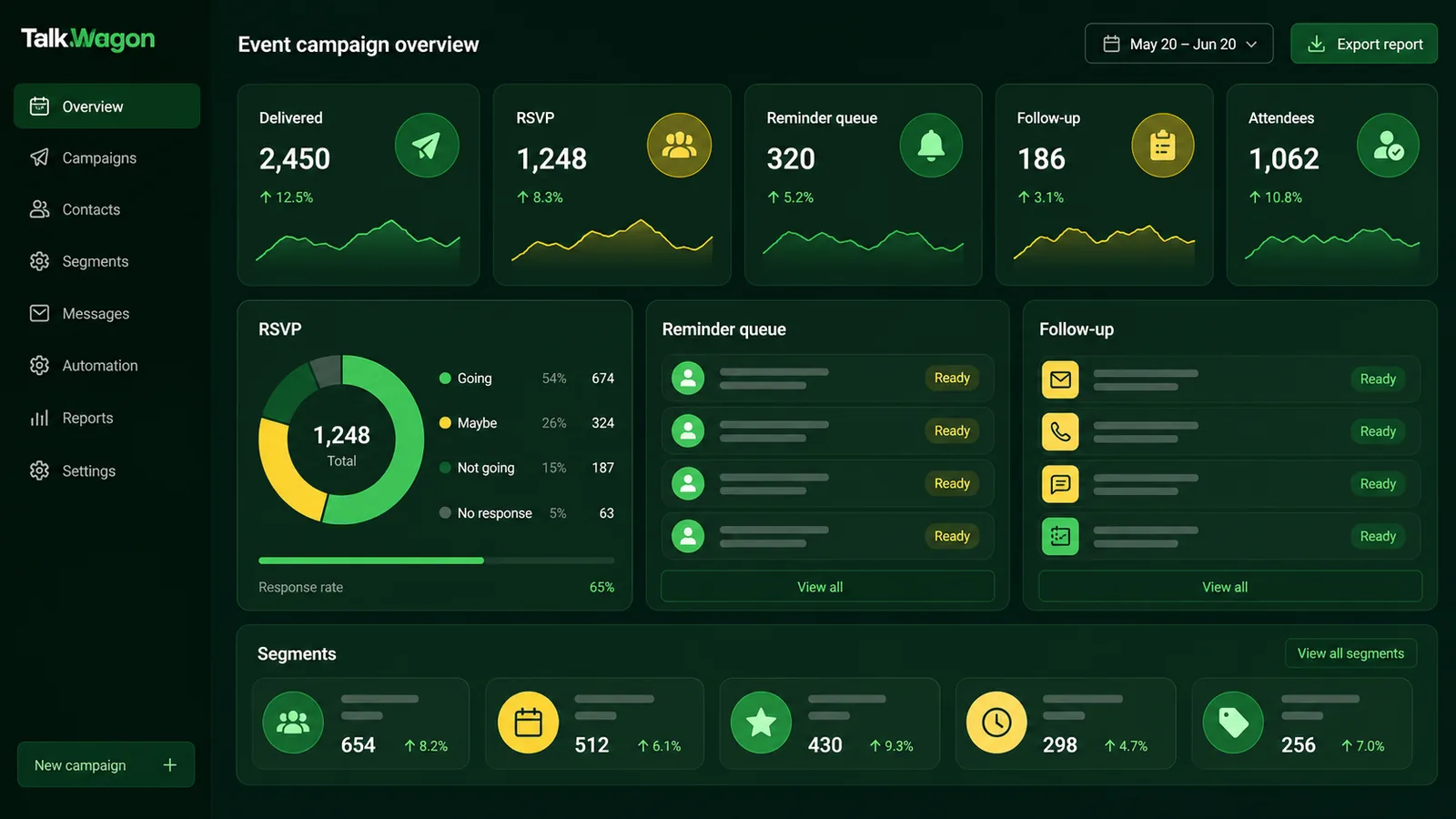
Event messaging should connect RSVP results, reminders, attendees, and follow-up tasks in one place.
Better event invitation examples
Short and direct
Hi {{name}}, you’re invited to {{event_name}} on {{date}} at {{time}}. Reply YES to attend or NO if you can’t make it.
Benefit-led
Hi {{name}}, join our {{event_name}} session on {{date}} to learn {{benefit}}. It’s built for {{audience}}. Reply JOIN and we’ll send the details.
Reminder after RSVP
Hi {{name}}, reminder: {{event_name}} starts tomorrow at {{time}}. Your access link is {{link}}. Reply HELP if you need assistance.
No-response follow-up
Hi {{name}}, quick check: would you like to attend {{event_name}} on {{date}}? Reply YES to reserve a place or NO if this is not relevant.
Post-event follow-up
Hi {{name}}, thanks for your interest in {{event_name}}. Here is the recap: {{link}}. Reply QUESTION if you want our team to help with next steps.
Common mistakes
Avoid these event invitation mistakes:
- missing date, time, or timezone;
- unclear RSVP action;
- too many links;
- no reminder plan;
- sending to people who did not opt in;
- sending the same wording to every segment;
- using an approved template but the wrong audience;
- failing to assign replies;
- sending reminders after someone declined;
- forgetting post-event follow-up.
The best event messaging system is not only a template collection. It is a workflow that knows who was invited, who confirmed, who needs help, and who should be followed up afterward.
How TalkWagon fits event messaging
TalkWagon connects event invitation messages to contacts, broadcasts, templates, automations, and shared inbox follow-up. Teams can prepare the audience, use approved templates, capture replies, assign questions, schedule reminders, and track follow-up work without losing customer context.
For event campaigns that use WhatsApp Business Platform messaging, TalkWagon’s public WhatsApp API pricing page helps teams understand estimated message costs before sending.
Final event invitation checklist
Before sending, confirm:
- the audience is relevant;
- opt-in and exclusions are checked;
- the event details are complete;
- RSVP action is simple;
- template category matches the message purpose;
- reminder timing is planned;
- replies have an owner;
- declined contacts are excluded from reminders;
- follow-up is ready for attendees and no-shows;
- success metrics are defined.
A good WhatsApp event invitation feels timely, specific, and easy to answer. It should help the customer decide quickly and help the team manage every response that follows.
Frequently asked questions
What should a WhatsApp event invitation message include?
It should include the event name, reason to attend, date, time, location or link, who it is for, RSVP action, deadline, and a way to ask questions or opt out where relevant.
Can businesses send event invitations on WhatsApp?
Yes, but they should send invitations only to people who have opted in or have a clear relationship with the business. On the WhatsApp Business Platform, a proactive event invitation will often need an approved template.
Is an event invitation a marketing or utility template?
Many event invitations are marketing because they promote attendance or engagement. A reminder for an event the customer already registered for may be closer to a utility update. The final category depends on the exact message purpose.
How many reminders should I send for an event?
A practical sequence is one invitation, one confirmation, one reminder 24 hours before, and one final reminder shortly before the event. Reduce frequency if the audience is sensitive or the event is low urgency.
How should teams handle event replies?
Route replies into a shared inbox, tag RSVP status, assign questions to the right person, update attendance lists, and prepare follow-up messages for attended, missed, and interested contacts.