WhatsApp Templates
WhatsApp Business Message Templates: Rules, Categories, Examples, and Approval Basics
A practical guide to WhatsApp business message templates: when they are needed, how categories work, what components to use, and how teams can manage approvals.
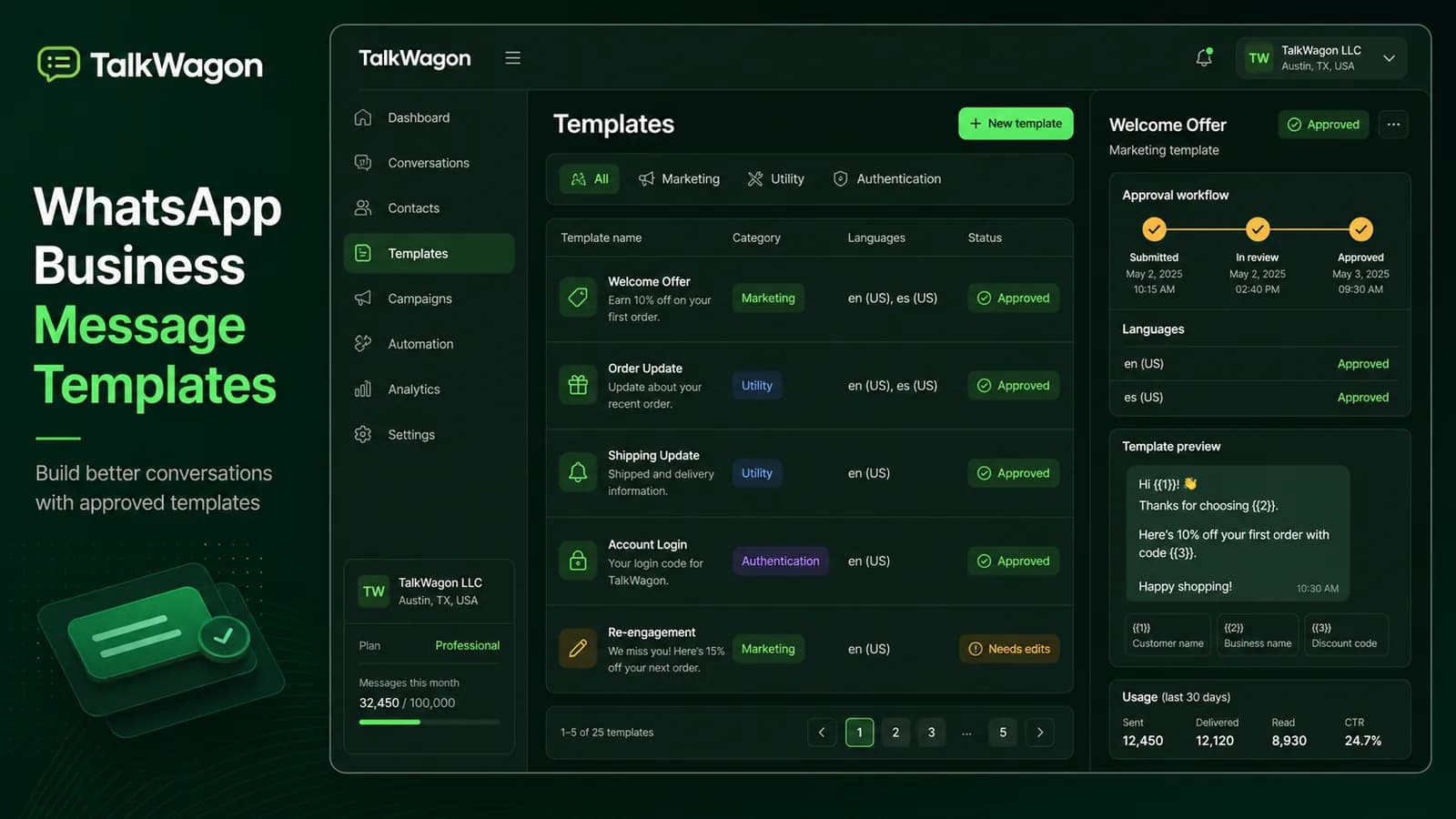
A WhatsApp business message template is not just a saved reply. It is a pre-approved message format that a business can use when it needs to start or continue certain customer conversations in a structured way.
Templates matter because WhatsApp is personal. Customers expect useful, relevant messages, not random marketing blasts. Meta’s template documentation separates template mechanics, components, and categories so businesses can send the right kind of message for the right purpose.
Quick answer: a WhatsApp business message template should have one clear purpose, the correct category, clean variables, useful buttons, and a review process before it is used in campaigns, reminders, alerts, or automations.
What a WhatsApp business message template is
A WhatsApp business message template is a reusable message asset submitted for approval before it is used in certain business-initiated conversations. Templates help WhatsApp understand the purpose of the message and help businesses keep outbound communication controlled.
Templates are especially important when:
- the business starts the conversation;
- the customer is outside an active service window;
- the message is sent at scale;
- the message is part of an automated workflow;
- a team needs consistent wording across agents or locations.
Template rules are stricter than ordinary chat replies because the message can reach customers before they ask a new question. That is why a template should be treated like a small customer-facing product asset, not a throwaway text snippet.
Template messages versus quick replies
Quick replies and templates solve different problems.
| Item | Purpose | Example |
|---|---|---|
| Quick reply | Helps an agent answer faster inside an active conversation | “Thanks, I’m checking that for you.” |
| Template | Lets a business send an approved structured message | “Your appointment is confirmed for {{date}} at {{time}}.” |
| Automation message | Uses a template or reply inside a workflow | Send a reminder 24 hours before an event |
Quick replies are useful for speed. Templates are useful for controlled outbound messaging, campaign consistency, compliance review, and automation.
Template categories
Meta’s current template model focuses on the purpose of the message. A team should choose the category based on what the customer receives, not what the business wants to call it.
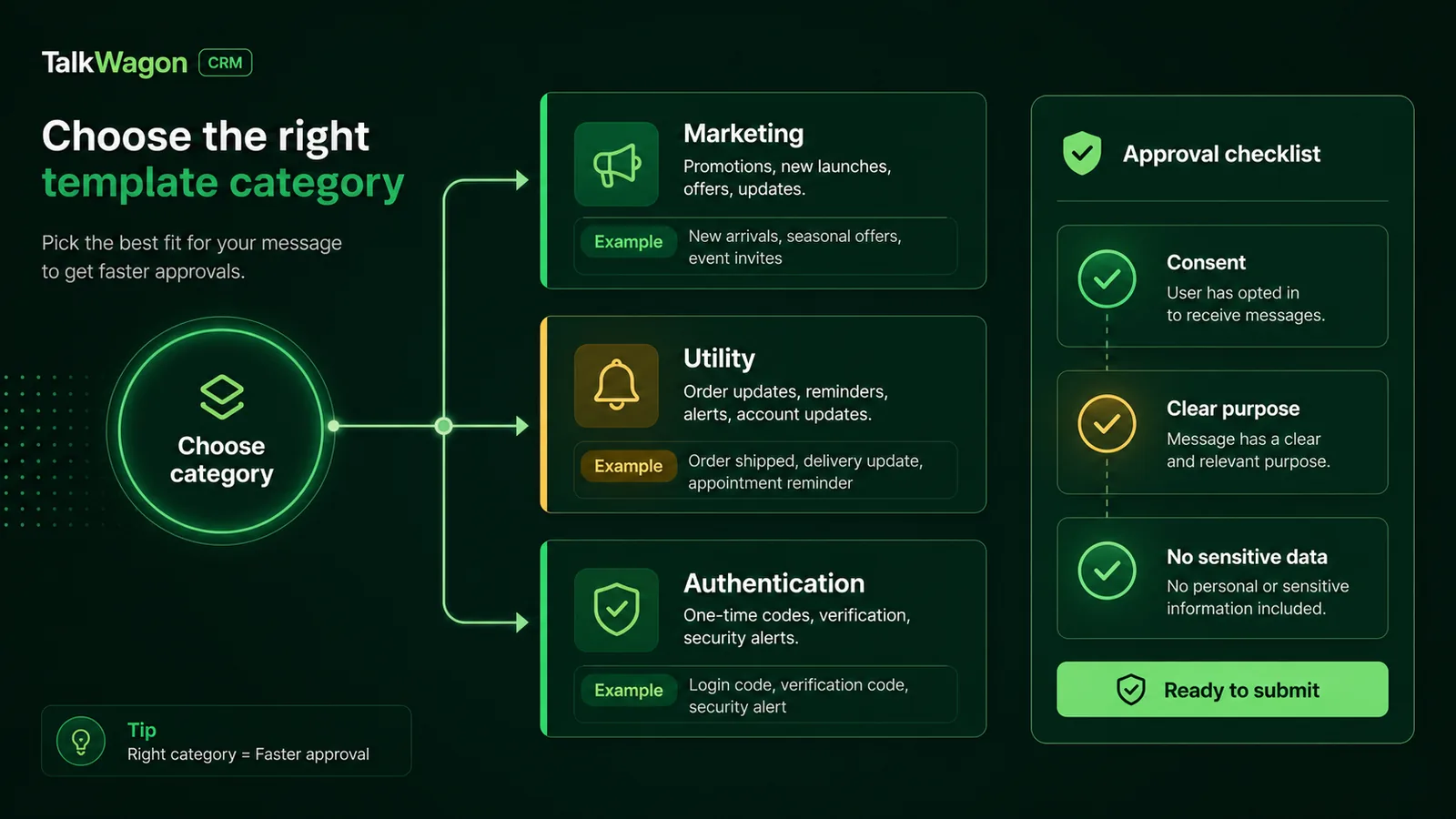
Choose the category by message intent: marketing, utility, or authentication. A clearer category usually means fewer approval surprises.
Marketing templates
Marketing templates are used for promotional or engagement messages. Examples include offers, product launches, newsletters, event invitations, abandoned-interest follow-ups, and reactivation campaigns.
Use marketing templates only for people who clearly opted in to receive that type of communication. Keep the value specific and avoid exaggerated claims.
Utility templates
Utility templates support an existing transaction, account, appointment, order, or service relationship. Examples include order confirmations, delivery updates, appointment reminders, payment reminders, renewal notices, or policy updates.
Utility templates should not sneak in promotional copy. If the message is mainly trying to sell something, it probably belongs in marketing.
Authentication templates
Authentication templates are used for verification codes and account-security flows. They should be short, specific, and free from marketing language.
Template components
Meta’s component documentation describes the main building blocks: header, body, footer, and buttons. A business does not need every component every time, but each part should have a job.
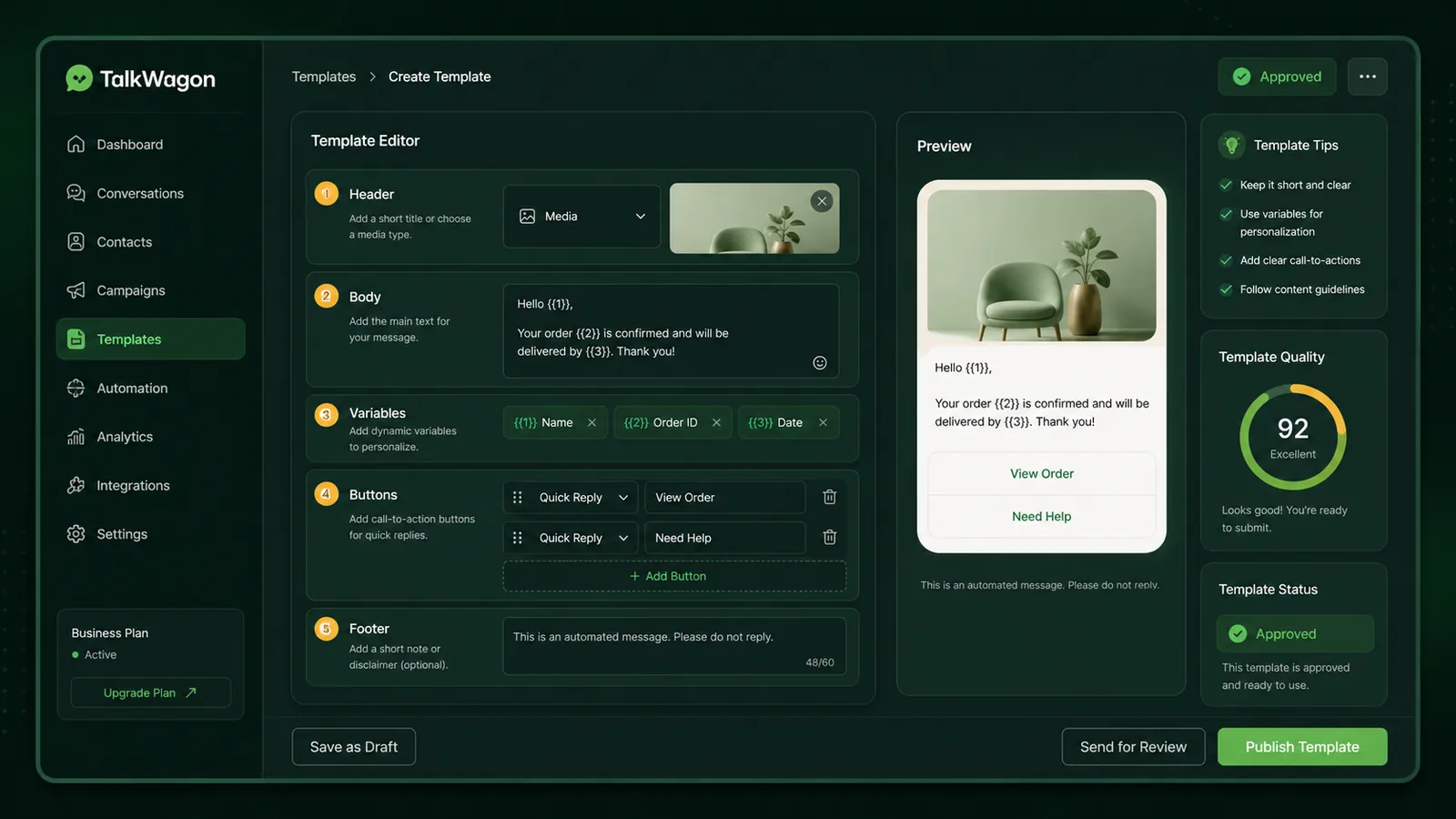
A strong template is easy to review: header, body, variables, buttons, and footer each support the same customer outcome.
Header
The header gives context. It can be text or media depending on the supported format and template purpose. Use it for a short title, confirmation label, or document/media context.
Body
The body carries the main message. It should be understandable even when variables are replaced with real customer values. Avoid vague placeholders such as “Hi {{1}}, your thing is ready.” Reviewers and customers need context.
Better:
Hi {{name}}, your appointment with {{business_name}} is confirmed for {{date}} at {{time}}.
Footer
The footer can add a small note such as “Reply STOP to opt out” for marketing messages or a short non-promotional disclaimer where appropriate.
Buttons
Buttons reduce friction. They can help customers confirm, reschedule, open a page, call, or choose a quick reply. Use buttons only when they make the next step clearer.
Approval basics
A template can be rejected when the purpose is unclear, the category does not match, the variables do not have enough context, the message looks misleading, the language is too promotional for a utility category, or the template contains sensitive or policy-problematic wording.
Before submitting, ask:
- Can a reviewer understand the message without internal context?
- Is the category honest?
- Are variables surrounded by enough explanation?
- Does the CTA match the message?
- Is the opt-out path clear for marketing?
- Is the language specific without being aggressive?
- Is the template reusable without becoming misleading?
Template library governance
Template approval is not the end. A template library needs ownership and maintenance.
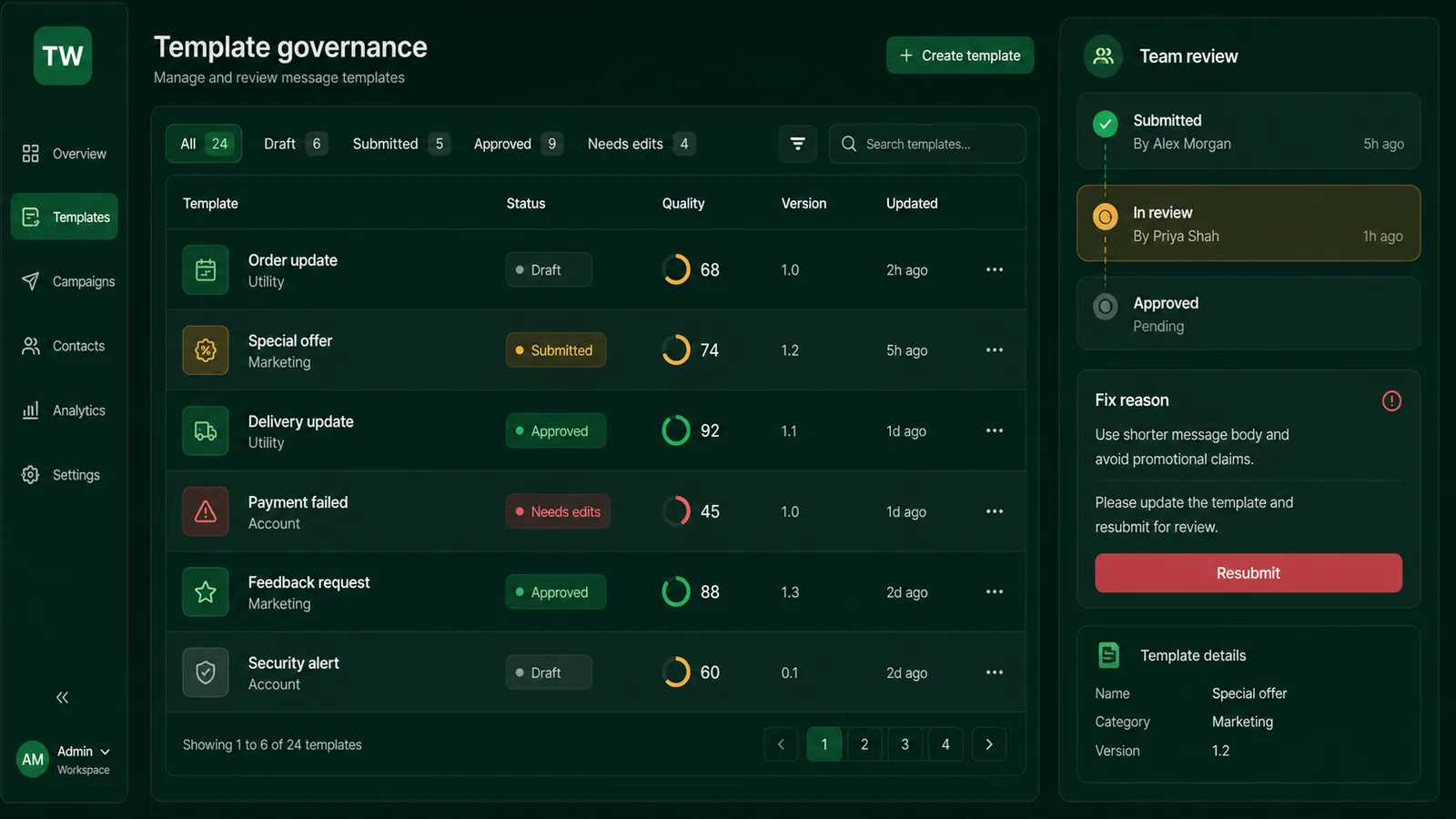
Governance keeps templates useful after approval: teams need owners, statuses, versions, quality notes, and a resubmission workflow.
Store these fields for each template:
- template name;
- category;
- language;
- approval status;
- business purpose;
- owner;
- variables and fallback rules;
- last reviewed date;
- campaign or automation using it;
- rejection reason if it failed;
- performance notes.
Without governance, teams often reuse old templates that no longer match the offer, policy, location, or product.
Naming, languages, and version control
Template naming sounds like a small detail until a team has dozens of approved messages. Use names that explain the use case, not names that only make sense to the person who created them.
Weak names:
promo_1;new_template_final;customer_msg;test_update_2.
Better names:
appointment_reminder_24h_en;order_shipped_update_en;webinar_invitation_marketing_en;payment_failed_utility_en;trial_onboarding_followup_en.
For multilingual teams, each language should be reviewed as its own customer-facing asset. A translated template is not automatically equivalent to the original. Tone, length, legal wording, and CTA clarity can change when language changes.
Version control also matters. If a template changes after approval, record why it changed and which campaigns or automations use it. This prevents a live workflow from depending on an outdated or renamed message.
Variables and fallback content
Variables are useful, but they are also one of the easiest ways to create bad customer experiences.
Every variable should answer three questions:
- What value will be inserted?
- What happens if the value is missing?
- Does the surrounding sentence still make sense?
For example, this template is risky:
Hi {{1}}, your {{2}} is ready.
It gives little context. A reviewer may not understand it, and a customer may receive a vague message.
This is stronger:
Hi {{customer_name}}, your appointment with {{business_name}} is confirmed for {{appointment_date}} at {{appointment_time}}.
The variable names are clearer, and the sentence explains the relationship between each value.
Use fallback rules in the CRM. If the first name is missing, use “there” or remove the greeting. If an order link is missing, do not send the message until the link is fixed.
Team approval workflow
Treat important templates like mini campaign assets. A practical review path is:
- Draft: the template owner writes the first version.
- Purpose review: a manager confirms the use case and category.
- Variable review: someone checks placeholders and fallback behavior.
- Customer experience review: support or sales checks whether customers will understand it.
- Submission: the approved draft is submitted for review.
- Library update: status, category, language, and usage notes are stored.
This workflow keeps templates consistent without slowing the team too much.
Practical template examples
Appointment confirmation
Hi {{name}}, your appointment with {{business_name}} is confirmed for {{date}} at {{time}}. Reply 1 to confirm or 2 if you need help rescheduling.
Why it works: it is specific, expected, and gives a simple next step.
Delivery update
Hi {{name}}, your order {{order_id}} is scheduled for delivery on {{date}}. Track your order here: {{tracking_link}}.
Why it works: the message is connected to an existing transaction and the link matches the customer’s expected action.
Event invitation
Hi {{name}}, you are invited to our customer workshop on {{date}}. Seats are limited. Reply YES to reserve your place or NO if you cannot attend.
Why it works: it names the event, explains the action, and keeps RSVP simple.
Feedback request
Hi {{name}}, thanks for choosing {{business_name}}. Could you rate your recent experience? Tap below to share feedback.
Why it works: it is tied to a recent interaction and does not overcomplicate the ask.
Writing rules that improve approval quality
Use plain language. Customers should understand the message on the first read.
Keep one purpose per template. A delivery update that also promotes an unrelated sale is harder to categorize and easier to dislike.
Give variables context. “Your order {{1}} ships on {{2}}” is better than “{{1}} {{2}} is ready.”
Use buttons sparingly. Too many buttons can make the template feel like a mini landing page instead of a helpful message.
Review by role. A marketer, support lead, and compliance-minded manager may notice different problems.
How templates fit into campaigns and automations
Templates become powerful when they are connected to real workflows:
- broadcast campaigns;
- appointment reminders;
- renewal reminders;
- abandoned-interest follow-up;
- event invitations;
- post-purchase feedback;
- payment or order updates;
- human handoff messages.
TalkWagon connects templates to broadcasts, automations, and shared-inbox follow-up so the team can see which template created which customer conversation.
Common mistakes to avoid
Do not create one generic template for every purpose. It will become vague and hard to maintain.
Do not hide promotional wording inside a utility message. Customers and reviewers notice.
Do not submit variables without context. Every variable should be understandable.
Do not forget languages. If your audience uses multiple languages, templates should be reviewed separately for each one.
Do not treat approval as permanent safety. A template can still perform poorly if the audience, timing, or follow-up workflow is wrong.
Final template checklist
Before submitting or using a template, confirm:
- the purpose is clear;
- the category matches the purpose;
- opt-in is appropriate for the use case;
- variables have safe context;
- buttons match the customer action;
- the language is concise;
- the owner is known;
- the status is current;
- the team knows where replies will go.
Good templates make customer communication easier to trust. They help teams move faster without sacrificing context, consent, or quality.
Frequently asked questions
What is a WhatsApp business message template?
A WhatsApp business message template is a pre-approved message format used by a business to start or continue certain WhatsApp conversations at scale, especially outside the customer service window on the WhatsApp Business Platform.
Which WhatsApp template categories are commonly used?
Meta categorizes templates into marketing, utility, and authentication use cases. The correct category depends on the message purpose, not just the wording.
What parts can a WhatsApp message template include?
Templates can include components such as a header, body, footer, and buttons. The body carries the main text and variables, while buttons can support replies, links, or actions.
Why do WhatsApp templates get rejected?
Common reasons include unclear purpose, incorrect category, misleading content, poor variable context, policy-sensitive wording, missing opt-out handling for marketing messages, or text that does not match the selected use case.
Can quick replies replace WhatsApp templates?
No. Quick replies help agents answer faster inside conversations. Templates are approved message assets used for business-initiated or structured messaging workflows. They solve different problems.
How should teams manage templates?
Teams should keep a template library with owners, categories, languages, approval status, variable rules, use cases, review dates, and performance notes so campaigns and service messages are not sent with outdated or risky content.