WhatsApp Marketing
How to Broadcast on WhatsApp: Lists, Consent, Templates, and Safe Operations
A practical guide for teams that want to send WhatsApp broadcasts without turning a campaign into spam, broken templates, or unmanaged replies.
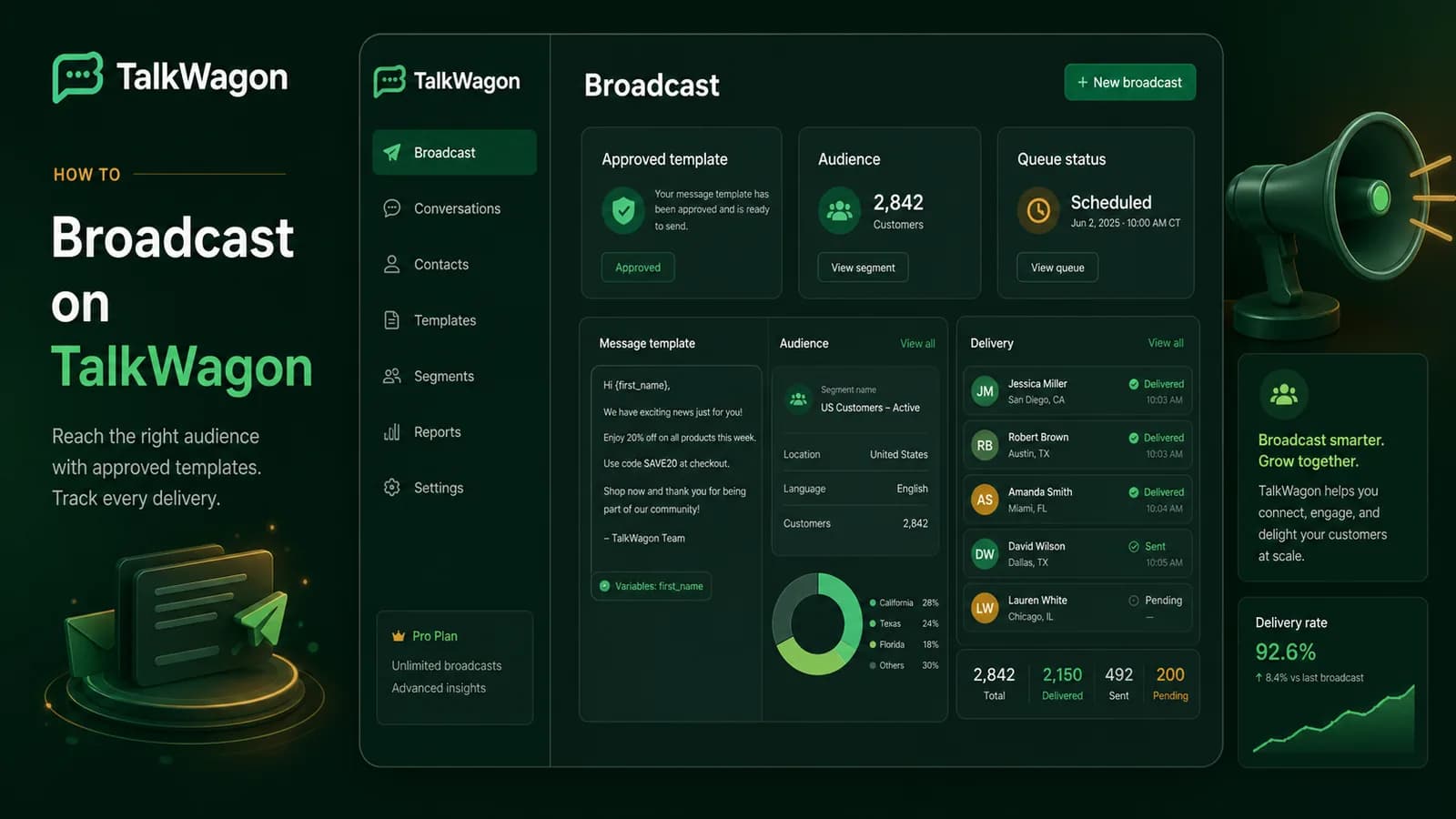
Businesses use WhatsApp broadcasts because one relevant message can reach a large audience quickly. The same workflow can also create spam complaints, failed templates, confused replies, or unmanaged follow-up when it is treated as a simple bulk-send button.
This guide explains how to broadcast on WhatsApp in a practical business setting: what a broadcast is, when the WhatsApp Business app is enough, when a CRM is safer, how consent and templates fit together, and what a team should check before and after sending.
Quick answer: a safe WhatsApp broadcast starts with permission, a clearly defined audience, an approved message or template, a controlled send window, and a team plan for replies. If more than one person handles customers, connect broadcasts to a shared inbox and contact history instead of sending from an isolated phone.
What a WhatsApp broadcast actually does
A WhatsApp broadcast sends one message to many selected contacts while keeping each recipient's reply in a private one-to-one conversation. It is not a group. Recipients do not see each other, and each reply returns as an individual conversation.
For a business, “broadcast” can mean three different workflows:
| Workflow | Best fit | Main risk |
|---|---|---|
| WhatsApp Business app broadcast list | Very small businesses with familiar contacts | Limited team ownership, reporting, and CRM context |
| CRM-managed broadcast | Sales, support, service, and marketing teams | Requires clean contact data and clear permissions |
| WhatsApp Business Platform campaign | Larger or automated sends using approved templates | Requires opt-in, template approval, delivery tracking, and policy-aware operations |
WhatsApp’s Help Center explains that broadcast lists let businesses send messages to selected contacts, and its business-broadcast guidance describes reviewing, sending, scheduling, and checking insights. Those native app features are useful for small operations, but a growing team usually needs more control than a saved contact list can provide.
Business app, CRM, or WhatsApp Business Platform
Choose the broadcast method based on the job.
Use the WhatsApp Business app when one or two people handle messaging, the audience is small, the campaign is occasional, and replies can be managed manually.
Use a CRM-managed workflow when several people need to share one customer operation, contacts need tags or lifecycle stages, managers need reply ownership, and campaign replies should create tasks, deals, or follow-up work.
Use the WhatsApp Business Platform when the business needs API workflows, approved templates, automation, message-cost estimates, detailed delivery states, or role-based controls.
TalkWagon’s broadcast workflow is designed for teams that need the middle layer: campaign control connected to the inbox, contact history, pipeline, automations, and human agents.
How to broadcast on WhatsApp step by step
Start with the business outcome, not the message text. A broadcast that announces a sale has different risk, timing, category, and follow-up needs than a service reminder or event update.
1. Define the outcome
Write one sentence that explains the goal:
- “Invite opted-in customers to book a weekend appointment.”
- “Notify active clients about a policy change.”
- “Invite warm leads to a webinar.”
- “Share a limited product update with customers who asked for updates.”
The outcome controls the audience, template category, CTA, success metric, and who must answer replies.
2. Build the audience
Do not send to “everyone” unless everyone truly needs the message. Segment by customer stage, product interest, location, language, purchase history, appointment status, or support status.
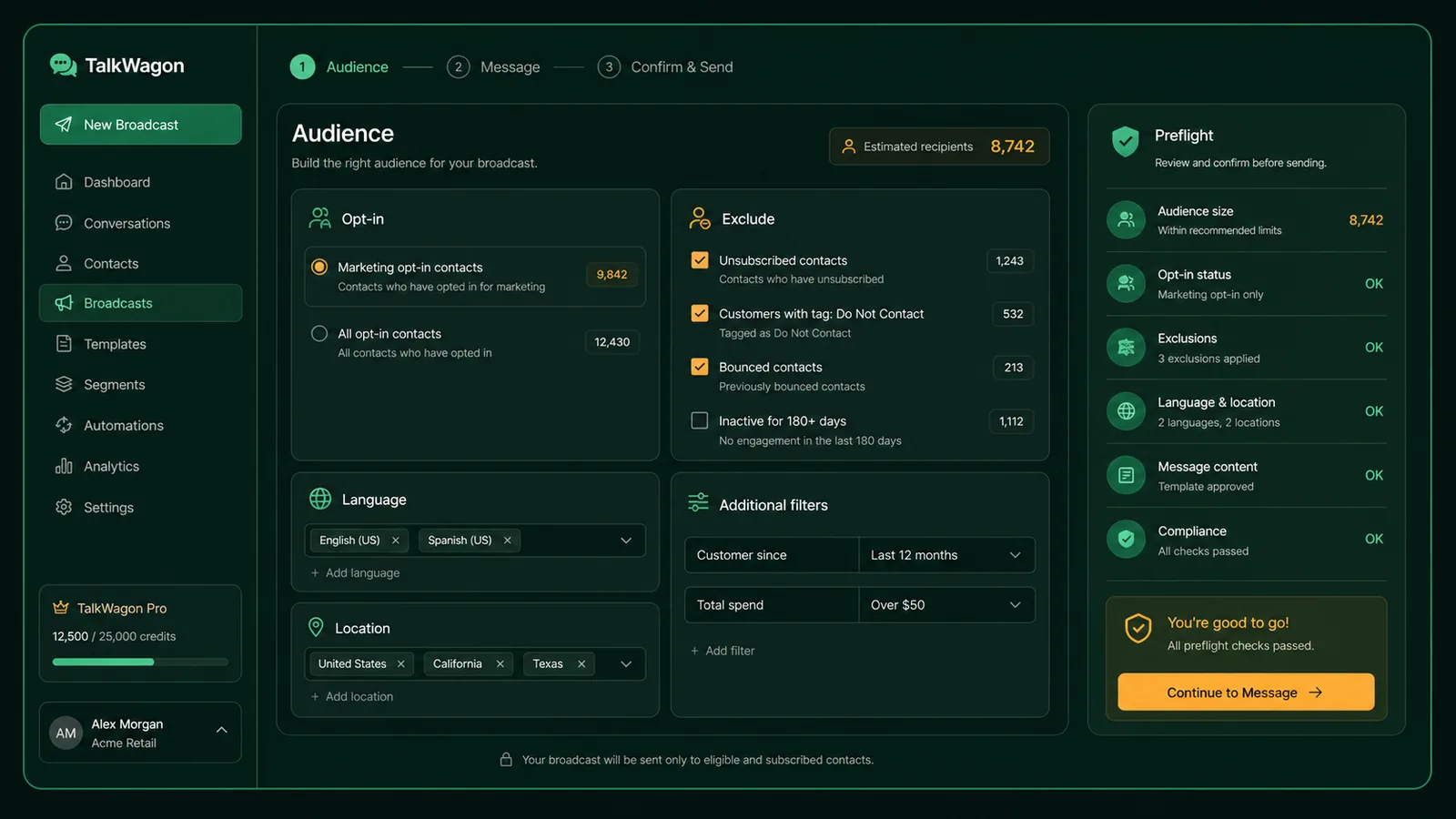
A stronger WhatsApp broadcast starts with audience, exclusion, consent, and preflight checks before the first message enters the queue.
3. Remove exclusions
Before sending, remove contacts who opted out, already received a similar message, are in an active support issue, are in the wrong country or language, recently complained, or should be handled by a human instead of a campaign.
This is where many broadcasts fail. The message may be technically correct, but the audience is wrong.
4. Choose the message type
If the customer is already inside an active service conversation, a free-form reply may be enough. If the business is initiating the conversation outside that context on the WhatsApp Business Platform, Meta’s template documentation explains that approved templates are normally used. The category and wording should match the purpose of the message.
5. Review variables and links
Every variable should have a safe fallback. If the template says “Hi {{1}},” make sure empty names do not produce awkward output. If the CTA sends people to a page, test the link on mobile and make sure it matches the promise in the message.
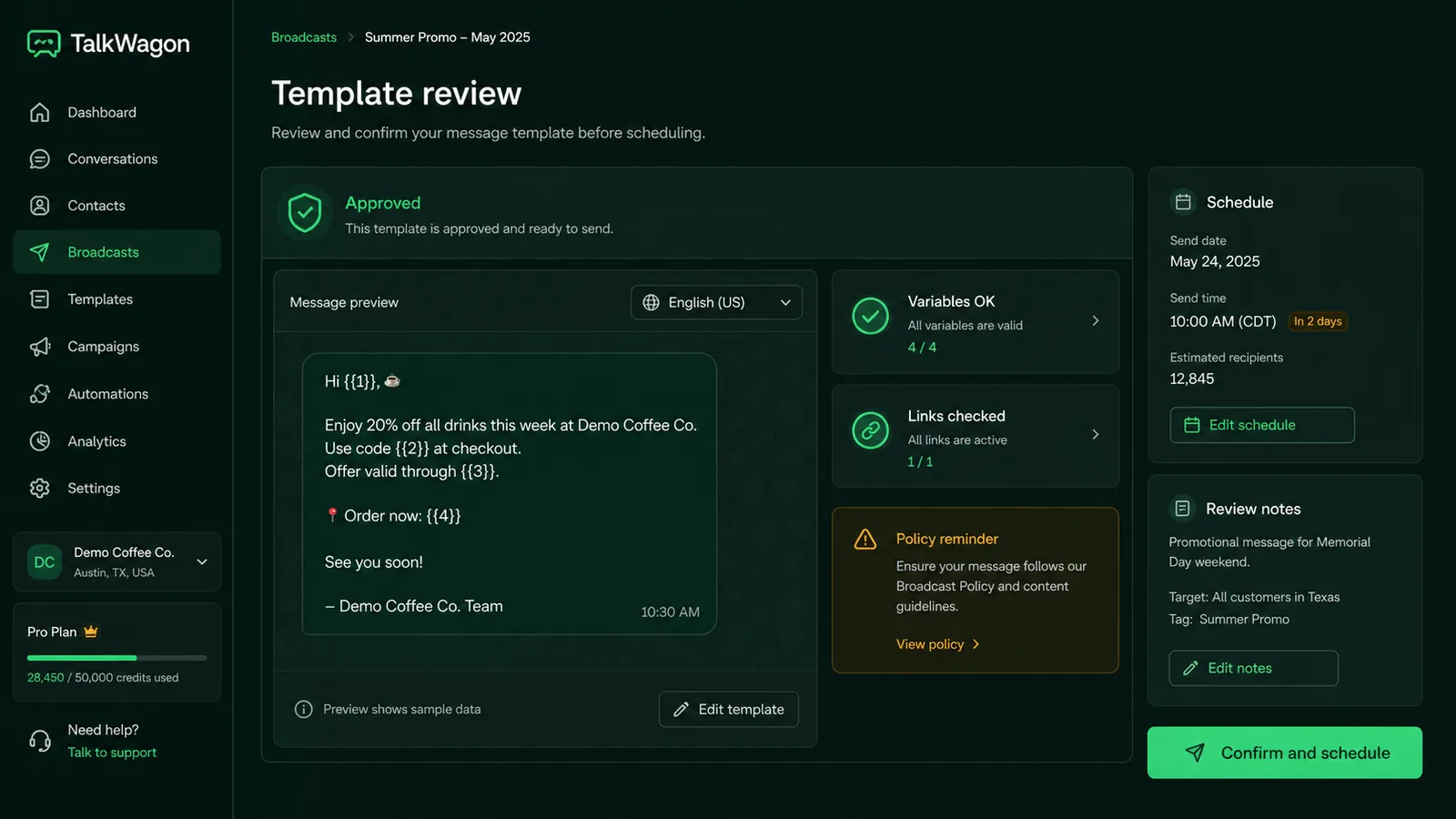
Template review should check category, variables, CTA, opt-out wording, and the reply plan before a campaign is scheduled.
6. Send in a controlled window
Avoid sending at random. Choose a time when the audience is likely to understand the message and when your team can handle replies. If the message may create questions, do not schedule it when no one is available.
7. Monitor the campaign after sending
Delivery is only the first layer. Watch delivered, failed, replied, opted out, blocked, and handoff states. The reply queue matters more than the send count because a successful broadcast often creates conversations.
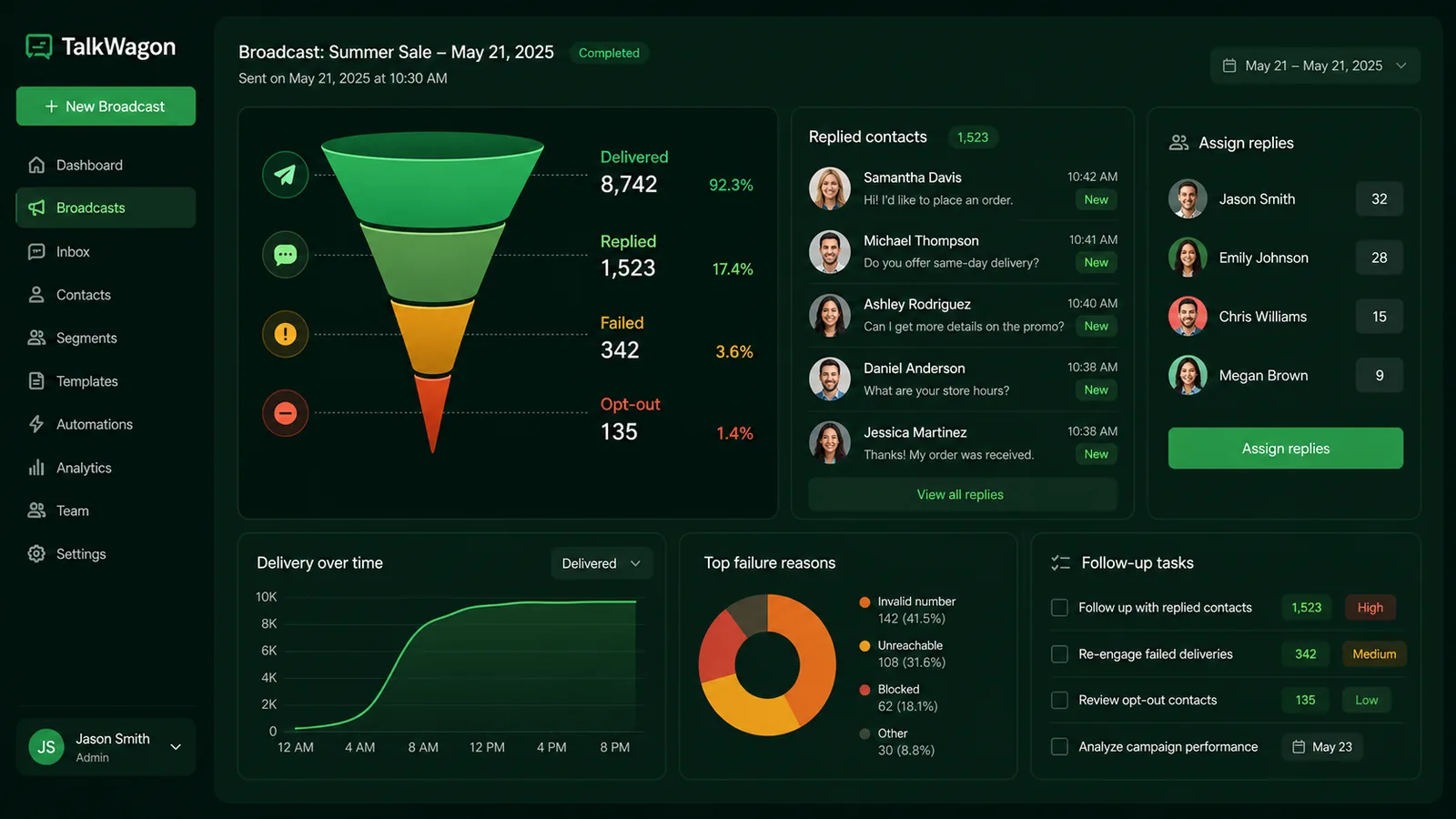
The real campaign work begins after delivery: replies need owners, failures need diagnosis, and follow-ups need a clean next step.
Consent and opt-out rules
Meta’s WhatsApp opt-in guidance requires businesses to obtain permission before messaging people on WhatsApp. In plain language, customers should understand who will message them, what they will receive, and how they can stop receiving messages.
For a CRM workflow, store consent as data, not as memory. Useful fields include:
- opt-in source;
- opt-in date;
- message types the person agreed to receive;
- language and country;
- unsubscribe or “stop” status;
- campaign history;
- last reply date.
Marketing broadcasts should also include an easy way to opt out. The exact wording depends on the market and use case, but the experience should be simple. If someone replies “stop,” your CRM should prevent that contact from being included in future campaigns.
Template and message structure
A good WhatsApp broadcast is short enough to understand immediately and specific enough to be worth receiving.
Use this structure:
- Context: why the customer is receiving the message.
- Value: what is useful, urgent, or relevant.
- Action: what to do next.
- Boundary: deadline, eligibility, or support option.
- Reply plan: what happens if the customer replies.
Example:
Hi {{name}}, your requested workshop reminder is here. The session starts tomorrow at 10:00 AM. Reply “JOIN” if you want the access link again, or “STOP” if you no longer want updates from us.
Avoid vague lines such as “Big update!!! Click now.” That may get attention, but it often creates low-quality replies and complaints.
Audience checks before sending
Before a campaign goes live, run a preflight checklist.
| Check | Why it matters |
|---|---|
| Opt-in confirmed | Reduces spam risk and policy problems |
| Segment is relevant | Protects deliverability and customer trust |
| Template approved | Prevents last-minute send failure |
| Variables tested | Avoids broken personalization |
| Links tested | Prevents bad customer experience |
| Team available | Ensures replies are handled quickly |
| Exclusions applied | Prevents messaging the wrong people |
| Cost estimate reviewed | Avoids surprise campaign spend |
TalkWagon’s WhatsApp API pricing page helps estimate message costs before a broadcast, while the CRM broadcast screen handles audience and workflow checks.
Operating model for larger teams
Once a broadcast reaches more than a handful of contacts, the team needs an operating model. This is the part many short broadcast tutorials skip.
Assign one person to own the campaign setup, one person to review the audience, and one person to watch replies after launch. In smaller teams, one manager may do all three jobs, but the jobs should still be clear.
Before sending, agree on:
- who can approve the audience;
- who can approve the template;
- who can pause or cancel the send;
- who handles failed numbers;
- who handles opt-out replies;
- who answers sales questions;
- who answers support questions;
- when the campaign is considered complete.
This matters because a broadcast is not only a marketing action. It touches support, sales, operations, and sometimes billing. A customer may reply with a complaint, a buying question, a cancellation request, or a request for human help. The team needs a route for each one.
What to measure beyond delivery
Delivery rate is useful, but it is not the whole story. A broadcast can have high delivery and still be poor if it creates irrelevant replies or opt-outs.
Measure:
- delivery rate: did the message reach the phone number;
- failure reasons: invalid numbers, unreachable contacts, template problems;
- reply rate: did people respond;
- positive replies: booking, RSVP, purchase intent, confirmation;
- support replies: questions or issues created by the message;
- opt-outs: people who asked to stop receiving messages;
- blocked or complaint signals: signs the message was not welcome;
- follow-up completion: whether the team finished the work created by the campaign.
The best broadcast is not always the one with the biggest audience. Often it is the one with the cleanest segment, the clearest offer, and the most manageable reply queue.
Broadcast examples for business teams
Promotional update
Hi {{name}}, our weekend offer is now live for customers who asked for product updates. You can view the details here: {{link}}. Reply STOP if you no longer want promotional messages.
Appointment reminder
Hi {{name}}, this is a reminder for your appointment on {{date}} at {{time}}. Reply 1 to confirm or 2 if you need help rescheduling.
Event invitation
Hi {{name}}, you are invited to our customer training session on {{date}}. Reply YES to reserve your seat or NO if you cannot attend.
Service notice
Hi {{name}}, we are updating our support hours from {{date}}. You can still message us here, and our team will reply during the new support window.
Each example needs different targeting and possibly a different template category. Do not reuse one generic broadcast template for every situation.
Common mistakes to avoid
The most common mistake is sending a message because a contact exists in the database. A phone number is not the same thing as permission.
Other mistakes include:
- mixing customers and leads in one campaign;
- sending in the wrong language;
- using a promotional template for a service update;
- failing to test variables;
- sending before the team is ready for replies;
- ignoring failed messages;
- sending follow-up broadcasts to people who opted out;
- measuring only delivery instead of replies and outcomes.
Several current broadcast guides focus mainly on the mechanics of creating a broadcast list. That is useful, but the operational layer is where growing teams usually need help: consent records, exclusions, templates, assignment, and post-send follow-up.
How TalkWagon supports broadcasts
TalkWagon connects broadcasting to the rest of the customer workflow. The goal is not only to send a message; it is to make sure the team knows what happens next.
With TalkWagon, teams can prepare the audience, exclude the wrong contacts, use approved templates, send campaigns, track progress, handle replies in the shared inbox, assign conversations, and connect follow-up work to contacts and pipelines.
That makes broadcasts safer for customers and more useful for the business. Instead of a disconnected bulk-send tool, the broadcast becomes part of a managed customer conversation system.
Final checklist before you send
Use this short checklist before every WhatsApp broadcast:
- The audience matches the message.
- Consent and opt-out status are checked.
- The template or message purpose is clear.
- Variables and links are tested.
- The send time is sensible.
- The team is ready to answer replies.
- Failed, replied, and opted-out states will be reviewed.
- Follow-up ownership is assigned.
If one of those items is missing, pause the campaign. A smaller, cleaner WhatsApp broadcast is usually better than a bigger campaign that creates complaints or unmanaged conversations.
Frequently asked questions
What is a WhatsApp broadcast?
A WhatsApp broadcast is a way to send one message to many selected recipients while keeping each recipient's conversation private. In a business workflow, broadcasts should be sent only to people who have opted in and should use approved templates when required by the WhatsApp Business Platform.
Can I broadcast on WhatsApp without a CRM?
Yes, very small teams can use the WhatsApp Business app broadcast-list feature. Larger teams usually need a CRM or WhatsApp Business Platform workflow for consent records, approved templates, segmentation, scheduling, failure handling, and reply ownership.
Do WhatsApp broadcasts need approved templates?
If the business initiates a message outside the customer service window on the WhatsApp Business Platform, it normally needs an approved message template. App-only broadcast behavior is different, but teams should still avoid sending unwanted messages.
How do I avoid spam complaints when broadcasting on WhatsApp?
Send only to opted-in contacts, keep the message relevant to the audience, identify the business clearly, give people an easy way to stop receiving messages, limit frequency, and monitor blocks, failures, and replies.
What should I track after sending a WhatsApp broadcast?
Track queued, sent, delivered, failed, replied, opted out, and handoff states. Delivery alone is not enough because replies, failures, consent changes, and follow-up ownership determine whether the campaign was useful.
Where does TalkWagon fit in a WhatsApp broadcast workflow?
TalkWagon helps teams prepare contact audiences, use approved templates, run broadcasts, track message progress, manage replies in the team inbox, and connect follow-up work to contacts, pipelines, automations, and human agents.